
Compare Data in Excel. Instantly. Accurately.
Manual data comparison has a 20–40% error rate even among experienced professionals. Stop wasting hours-automate row and cell-level analysis in seconds.
Why Traditional Methods Fail
You already know the frustration. Here's exactly why existing approaches fall short.
Only finds what exists-can't identify deleted rows, compare multiple columns simultaneously, or detect which specific cells changed.
Highlights differences visually but provides no summary, doesn't identify new or deleted rows, and breaks when you refresh data.
Takes hours even for 500-row datasets, guarantees human error (20–40% variance miss rate), and isn't scalable for weekly or monthly cycles.
Requires significant technical knowledge, doesn't auto-highlight cell-level variances, and needs reconfiguration for each new comparison.
Three-Level Analysis-Completed in Under 60 Seconds
The template uses intelligent VBA automation to perform analysis that would take hours manually.
Row-Level Identification
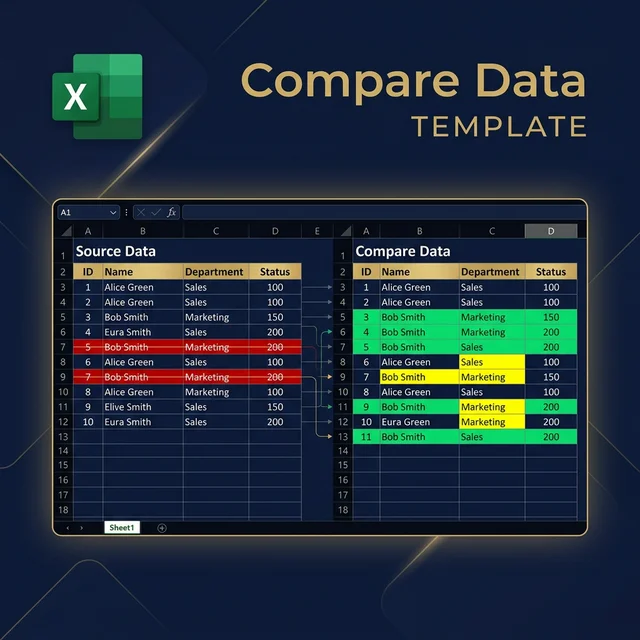
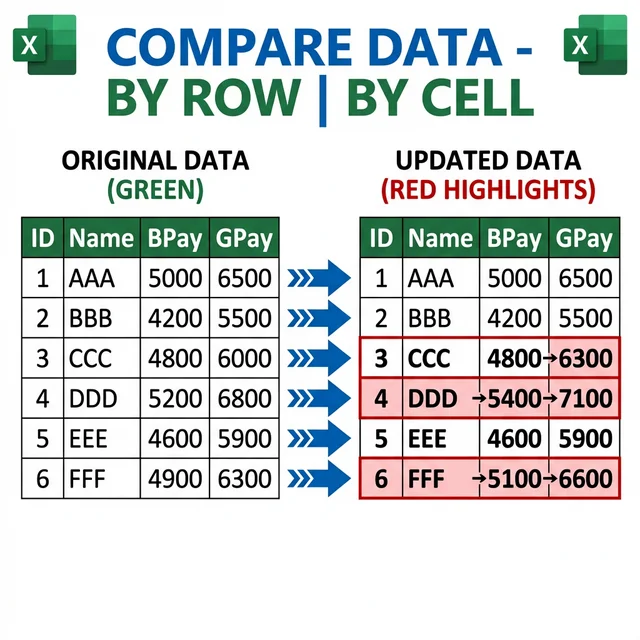
Every row is categorised as Added (new data, highlighted green), Deleted (removed data, highlighted red), or Existing (matched rows eligible for deeper analysis). This immediately answers: how much has my data changed overall?
Cell-Level Variance Detection
For rows existing in both datasets, the template compares every single cell. Variance cells are highlighted in yellow, preserving both old and new values side by side. Unlike manual methods, it catches 100% of changes-including subtle single-digit differences in long numbers.
Comprehensive Variance Report
The output is a professionally formatted Excel report containing a summary dashboard (total rows compared, added, deleted, variances), an Added Data sheet, a Deleted Data sheet, and a Variance Data sheet with side-by-side old vs. new values. Ready to share with managers, auditors, or stakeholders immediately.
Step-by-Step Training Guide
Watch how to set up and use the Compare Data Template to automate your workflow.
Pro Tip: Clean Your Data Before You Compare
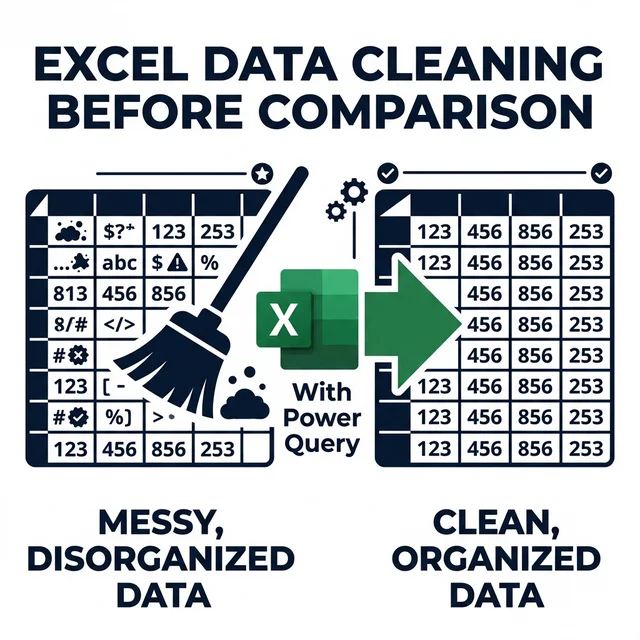
Inconsistent formatting, trailing spaces, and mixed case values cause false positives. Use Power Query to standardise your data before running the comparison-it eliminates noise and ensures every detected variance is a genuine change.
- Trim trailing spaces that are invisible but cause mismatches
- Standardise date formats (DD/MM/YYYY vs MM/DD/YYYY)
- Normalise text case (UPPERCASE vs Title Case)
- Remove duplicate headers that corrupt row-matching logic
What Makes This Template Unique
Built for professionals who need reliable results-not workarounds.
One-Click Automation
Load your data, click Compare, and get a full variance report in under 60 seconds. No formulas to write, no code to understand.
Three-Level Analysis
Identifies new rows, deleted rows, and cell-level changes within matching records-all in a single run.
Reusable Forever
Set up once for your data structure. Next month, paste new data and click Compare. Zero reconfiguration needed.
Customisable Highlighting
Choose your own colours for added, deleted, and changed data. Match your organisation's reporting standards.
No Technical Skills Required
If you can copy and paste data into Excel, you can use this template. Most users run their first comparison within 10 minutes.
100% Accuracy
Unlike manual review with a 20–40% error rate, the VBA engine catches every single variance-zero exceptions.
Who Needs This Template?
Used across finance, HR, operations, and data teams in every industry.
Accountants & Auditors
Monthly trial balance comparisons, account reconciliations, fraud detection
HR & Payroll Managers
Employee roster changes, salary adjustments, benefit modifications
Data Analysts
ETL validation, data quality assurance, master data management
Sales & Commission Analysts
Commission disputes, customer database changes, territory tracking
Inventory Managers
Cycle count reconciliation, stock movement tracking, supplier catalog comparison
Portfolio Managers
Holdings comparison between dates, compliance reporting, performance attribution
Why This Template Is Worth 100× Your Investment
Let's do the maths on return on investment.
And this doesn't include eliminated errors, faster decisions, reduced stress, or improved credibility from delivering accurate reports quickly.
Stop Wasting Hours. Start Comparing Intelligently.
Every hour you spend manually comparing spreadsheets is an hour not spent on strategic analysis, client relationships, or high-value work that advances your career.
- Complete Excel VBA Workbook (.xlsm) - ready to use immediately
- Detailed User Guide (PDF) with step-by-step instructions and screenshots
- One-Time Setup Support via email or phone call
- Full Report Customisation Assistance
- Lifetime Template Updates - free forever
- 15-Day Money-Back Guarantee - zero risk
- Bonus: Quick Reference Card for common tasks
Also explore our Cash Flow Forecast template or browse all premium templates in the downloads section.
Compare Data Template
Version 4 - Excel VBA (.xlsm)
One-time purchase · Lifetime updates
15-day money-back guarantee · Instant download
Get Started in 5 Minutes
From purchase to first comparison in under five minutes.
Purchase & Download
2 minutes
Click Get Template Now, complete your purchase, and immediately download the Compare Data Workbook to your computer.
Open & Enable Macros
1 minute
Open the workbook in Excel. When prompted about macros, click Enable Content to activate the comparison functionality.
Load Data & Compare
2 minutes
Copy your previous dataset into the Previous Data sheet, your current data into the Current Data sheet, then click Compare Data. Your report generates instantly.
What Professionals Say
“I was spending 4–5 hours every month comparing employee payroll data to catch errors before processing. This template reduced that to literally 5 minutes. It's paid for itself hundreds of times over.”
Sarah M.
HR Manager, Manufacturing Company
“As an auditor, I need to compare financial data constantly. This template has become my most-used tool. It catches variances I would have missed manually, and my clients are impressed with the professional reports.”
David K.
CPA, Public Accounting Firm
“We track inventory across 3 warehouses with weekly cycle counts. Before this template, reconciliation took our team 6+ hours weekly. Now it takes 20 minutes. Game-changer.”
Jennifer L.
Operations Manager, Distribution Company
Frequently Asked Questions
What size datasets can this template handle?
Tested with datasets up to 50,000 rows. On a standard business computer (Intel i5, 8 GB RAM), comparisons complete in under 60 seconds. For typical 500–10,000-row datasets, expect 5–15 seconds.
Do I need VBA programming knowledge?
No. The template is completely ready to use. Copy your data into the designated sheets and click the Compare Data button. All code runs automatically in the background.
Can I compare datasets with different column orders?
Yes, with minor setup. The template includes configuration settings where you can map columns between datasets even if they appear in different orders. The user guide covers this with screenshots.
Does this work with Google Sheets?
No-VBA runs exclusively in Excel on Windows. However, you can export Google Sheets data as .xlsx, then use the template for comparison.
What Excel version do I need?
Excel 2010 and later on Windows. Mac Excel has limited VBA support, so Windows is recommended for full compatibility.
How do I handle data with formulas?
Use Paste Special → Values to convert formulas to static values before comparison. The template compares values, not formula logic, ensuring accurate results.
Can I compare more than two datasets at once?
The current version compares two datasets (previous vs. current). For multiple comparisons, run the template multiple times-e.g., A vs. B, then B vs. C.
What is your refund policy?
15-day money-back guarantee, no questions asked. If the template doesn't meet your needs, email us within 15 days for a full refund.
Do you offer bulk or team licences?
Yes. Contact us for volume pricing-discounts available for 5+ licence purchases.
Is technical support included?
Yes. Your purchase includes one-time setup support via email or phone call. We'll help you configure the template for your specific use case.
Don't Waste Another Hour on Manual Data Comparisons
The professionals who succeed aren't those who work harder-they're those who work smarter. This template eliminates tedious manual work, ensures 100% accuracy, and frees you to focus on what actually matters.
Secure payment · 256-bit encryption · Instant download
Questions? Contact us at our contact page or explore related resources: XLOOKUP vs VLOOKUP · Power Query for Accountants
Compare Data in Excel VBA Template - Version 4 · Created by Prashant Panchal, ACA · FinDataPro