
Ultimate Excel Pro Prepaid Expense Template
Automate Prepaid Expense Tracking, Amortization & Month-End Closing in Minutes-Not Hours. Stop the manual spreadsheet nightmare and close your books with 100% accuracy.

The Month-End Closing Nightmare
It's 6:45 PM on the last day of the month. You're still at the office, staring at a spreadsheet of prepaid expenses that need reconciliation.
Your Challenges
- •Tracking dozens of items (insurance, rentals, VISA fees)
- •Calculating accurate monthly amortization manually
- •Updating prepaid balances on the balance sheet
- •Recording expense recognition correctly on P&L
- •Maintaining a perfect audit trail
The Reality
According to accounting efficiency research, accountants spend an average of 5-7 days on month-end close, with prepaid reconciliation being one of the most time-consuming tasks.
"What if you could complete prepaid expense management in 10 minutes with 100% accuracy?"
Powerful Automation. Professional Results.
The professional-grade solution that handles every aspect of prepaid expenditure management.
Dynamic Opening Balances
Start using the template any time during the year. It automatically calculates starting balances for existing items-no need to wait for Jan 1st.
Automatic Amortization
Calculates accurate monthly expense recognition instantly. Handles partial months and irregular schedules with zero manual intervention.
Multi-Year Forecasting
Project prepaid expenses 5-10 years into the future. Model renewal scenarios and budget P&L impacts with just a few clicks.
Scalable Period Settings
Configure amortization periods from 1 month to 10+ years. Supports monthly, quarterly, annual, and custom arrangements seamlessly.
VBA Data Controls
Formula protection and data validation ensure integrity. Prevent accidental deletions and maintain audit-ready records across your team.
Dynamic Dashboard
Visual analysis of balances, trends, and upcoming expirations. High-impact charts ready for management and stakeholder reporting.
One-Click Scalability
Expand your tracking in seconds. The VBA-powered 'Add Category' button creates new sheets and links them to the dashboard automatically.
See the Template in Action
Real screenshots from the production template - what you actually get.
Full Video Walkthrough: See exactly how to use the model, configure categories, enter data, and leverage every feature - from opening balances to the dynamic dashboard.
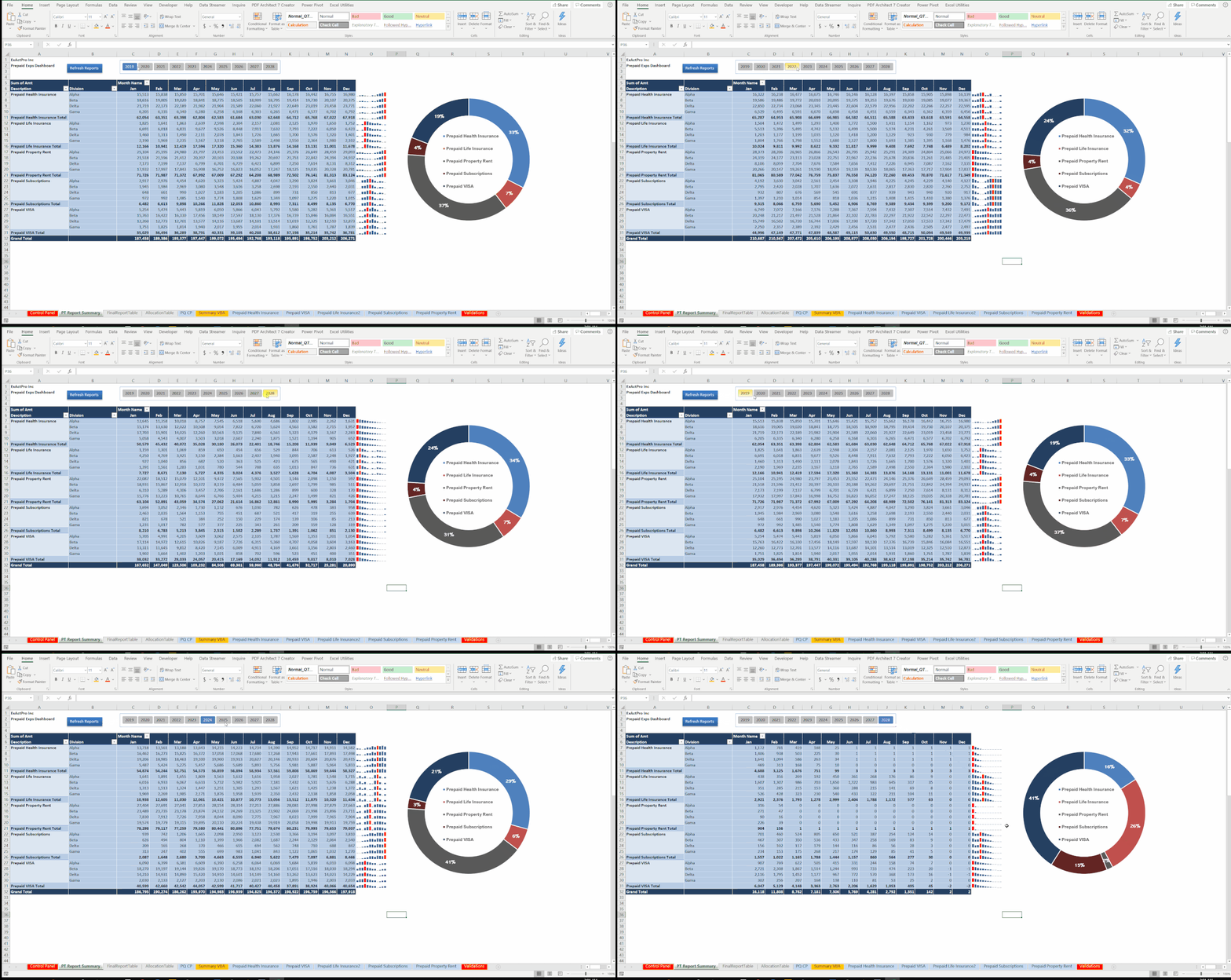
Live Dashboard Demo: Watch how the template automatically updates charts, balances, and amortisation schedules in real time as you enter data.

Allocation Table: Monthly amortisation breakdown with automatic opening balance calculation - tracks every prepaid item from start to expiry.

Multi-Category Tabs: Each prepaid category gets its own sheet - Insurance, Rentals, Subscriptions, VISA, Electricity - all feeding into one consolidated summary.
Dynamic Opening Balances
Unlike other templates that force you to start on January 1st, our solution works whenever you're ready.
- Automatically calculates balances for any start date
- Accounts for items paid before your implementation
- Ensures balance sheet accuracy from day one
- Eliminates manual entry of legacy data
Precise Multi-Year Forecasting
Budgeting future prepaid expenses and their P&L impact doesn't have to be a manual projection nightmare.
- Project expenses 5-10 years into the future
- Model price increases and renewal scenarios
- Generate budget-ready summaries by year
- Analyze cash outflow vs. P&L expense impact
All Your Prepayments. One System.
Whether it's a 1-month recharge or a 10-year rental, we handle it all.
Insurance Prepayments
Track multiple policies, renewal dates, and monthly coverage recognition automatically.
Subscription & Professional
Manage annual or multi-year license fees and association dues with precision.
Operational Prepayments
Perfect for office leases, service agreements, and corporate card annual fees.
Marketing & Advertising
Monitor annual commitments and ensure accurate timing of marketing expenses.
Is This Template Right For You?
Designed to save time for anyone managing deferred assets and monthly reconciliations.
Accountants & Finance Managers
The Pain: Managing dozens of items, calculating monthly amortization, and ensuring balance sheet reconciliation.
Time Saved: 4–6 hours per month-end
Small Business Owners
The Pain: Tracking prepayments without expensive software while ensuring accurate financial statements.
Time Saved: 3–5 hours per month
Auditors & Compliance Officers
The Pain: Verifying balances and validating amortization treatment during audit engagements.
Time Saved: 2–3 hours per audit
Financial Analysts & FP&A
The Pain: Forecasting future commitments and budgeting P&L impact for multi-year scenarios.
Time Saved: 5–7 hours per budget cycle
Calculate Your Savings
"The investment pays for itself in less than a month. Stop wasting time on repetitive manual tasks and focus on the strategic analysis that actually moves the needle."
Stop the Struggle.
Automate Today.
Join hundreds of professionals who have reclaimed their month-end evenings. Your purchase includes everything you need.
- Complete Excel VBA Workbook (.xlsm) - Pro Version
- Step-by-step PDF User Guide with full documentation
- Sample data and calculation walkthroughs
- VBA-powered 'Add Category' scaling tool
- Multi-year forecasting & budgeting module
- One-time expert Setup Support included
- Lifetime updates as features improve
Bonus: Build it Yourself?
Want to learn the advanced Excel techniques used for this model? Enroll in our Udemy course.
Explore Udemy Course Option →Ultimate Excel Pro
Prepaid Expenditure Template
One-time payment · Instant access
Instant Implementation
Total setup time is just 7 minutes. Ongoing monthly maintenance takes 10 minutes.
Purchase
Submit the form to get your discount, complete purchase, and download the .xlsm workbook instantly.
Configure
Open the workbook, enable macros, and input your current prepaid details into the intuitive entry sheets.
Automate
Watch as balances, amortizations, and dashboard visuals update automatically every single month.
Frequently Asked Questions
What Excel version do I need?
The template works with Excel 2010 and later versions on Windows. Mac Excel has limited VBA support, so Windows is recommended for full functionality.
Can I customize the template for my specific needs?
Yes. The template is fully customizable. You can modify categories, add custom fields, adjust formulas, and tailor the dashboard. A user guide is included.
How many prepaid expense items can the template handle?
The template can manage hundreds of items simultaneously. Performance remains excellent even with 200+ active prepaid expenses being tracked.
Does this work for accrued expenses or deferred revenue?
It's specifically designed for prepaid assets that amortize to expenses. However, the same methodology can be adapted for accruals with minor logic changes.
Can multiple users access the template simultaneously?
VBA-enabled workbooks don't support true simultaneous editing. We recommend designated ownership or using OneDrive/SharePoint for version control.
Is training included?
Yes, a detailed PDF user guide is included. We also offer one-time setup support. For deep technical training, our Udemy course is available separately.
What is your refund policy?
We offer a 15-day money-back guarantee. If the template doesn't meet your needs for any reason, request a full refund within 15 days-no questions asked.
Finally, a Month-End Close That Doesn't Drains You
Don't let another month-end close consume your evening. Invest in efficiency, accuracy, and your well-being.
Get My Discount Code Now →Ultimate Excel Pro Prepaid Expenditure Template | Verified by FinDataPro