
AR Intelligence Manager: The Accounts Receivable Excel Template That Replaces Manual AR Work
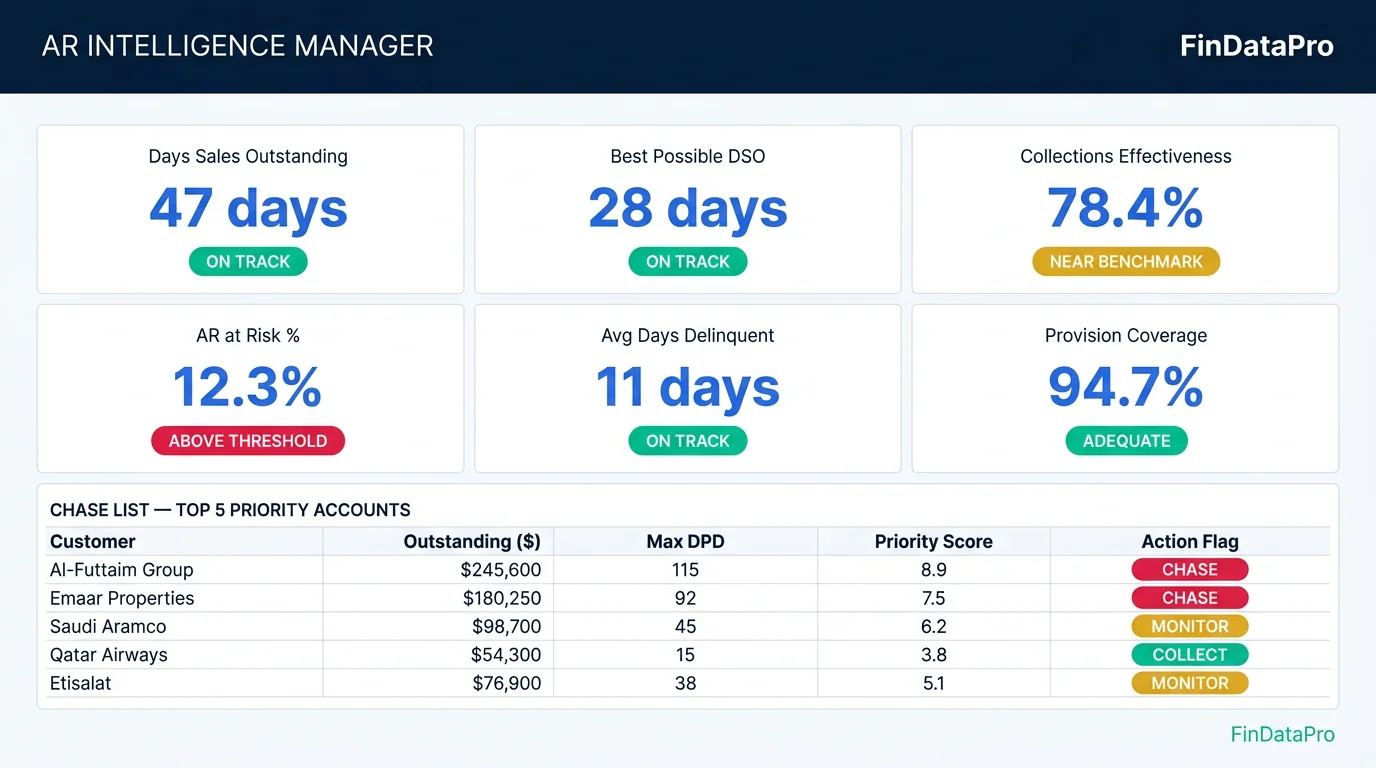
The AR data sits in the ERP. The aging report is exported to Excel every month. Someone formats it manually, calculates DSO, eyeballs the overdue list, and writes a management commentary that takes half a day.
Then the next month, they do it again.
AR Intelligence Manager solves this. It is an advanced accounts receivable Excel template built specifically for B2B finance teams: engineered to transform your raw invoice and payment data into a complete AR intelligence system in seconds. No manual calculations. No formatting. No guesswork about which customers to chase first.
You press one button. The tool does the rest.

ACA | FMVA® | 19 Years in Finance
Watch the complete walkthrough: both editions, step by step.
Covers setup and use of the Standard and Power Query editions, the ranked Chase List, IFRS 9 ECL provisioning, the six-month cash forecast, the dynamic KPI benchmarks, and the AI Commentary tab.
What Is AR Intelligence Manager?
AR Intelligence Manager is a Microsoft Excel workbook powered by Power Query and, optionally, connected to an AI language model. It takes your invoice and payment data and produces:
Ranked Chase List
Every customer with an outstanding balance ranked by Priority Score, starting with the most urgent.
IFRS 9 ECL Provisioning
Automated provision matrix under §5.5.15 across every aging bucket.
Six-Month Cash Forecast
Expected cash by Segment and Customer across six 30-day windows.
Six Dynamic KPIs
DSO, Best Possible DSO, CEI, AR at Risk %, Avg Days Delinquent, Provision Coverage.
AI Commentary
Analyst-grade management report generated from your live data in under 30 seconds.
Monthly Snapshot
Frozen month-end picture for trend history and IFRS 9 audit documentation.
It is built for GCC and Middle East B2B finance teams: Government, Construction, and Retail receivables portfolios. The framework works for any B2B sector where you manage credit terms and need a documented collections process.
“You do not need to know Power Query, formulas, or VBA to use this tool. You need to know your data and how to press a button.”
The Six Features That Replace Manual AR Work
Most AR tools give you a better-formatted version of what you already have. AR Intelligence Manager replaces the manual layer entirely.
Ranked Chase List
Every customer with an outstanding balance ranked by Priority Score: a composite of invoice age, amount owed, and risk tier. Your collections team works from row 1 downwards. No judgement calls about who to chase first.
IFRS 9 ECL Provisioning
Automated provision matrix under IFRS 9 §5.5.15. Choose IFRS 9 rates, Internal Policy rates, or Higher of Both. Every invoice provisioned at the correct rate based on its aging bucket.
Six-Month Cash Forecast
Expected cash collection by Segment and Customer across six 30-day windows. Timing based on actual days overdue or each customer's DSO overrun history. Amounts adjusted by lifetime Collection Efficiency.
Dynamic KPI Benchmarks
Six KPIs calculated against benchmarks derived from your own portfolio composition, not generic industry averages. If your mix is 60% Government on 90-day terms, your DSO benchmark reflects that.
AI Commentary
Connect any supported AI provider (Anthropic, OpenAI, DeepSeek, Groq) and generate an analyst-grade management report in under 30 seconds. Executive Summary, DSO analysis, Risk Report, and Collection Priority Brief in one click.
Monthly Snapshot
Captures a frozen month-end picture of your AR portfolio, building a trend history for Board reporting and IFRS 9 audit documentation. DSO movement, Tier C balance growth, provision adequacy over time.
How the Chase List Priority Score Works
The ranking is not arbitrary. Each customer receives a composite Priority Score calculated from three factors:
| Factor | What It Measures | Why It Matters |
|---|---|---|
| Invoice Age | How old is the most overdue invoice? | Older debt is harder to collect. Time is the most expensive variable in AR. |
| Amount Outstanding | Total balance owed by the customer | Prioritises high-value accounts over small balances that are technically older. |
| Risk Tier | A (low risk), B (medium), C (high) | Tier C customers with large balances and old invoices top the list. Tier A customers with minor delays rank lower. |
Each customer row in the Chase List also shows: Credit Days, Customer DSO vs Credit Terms, DSO Overrun Days, Total Outstanding, Max Days Overdue, Collection Efficiency %, Expected Collection, and a plain-language Action Flag: CHASE, MONITOR, or COLLECT.
IFRS 9 Provisioning: Two Methods, One Tool
The tool calculates expected credit losses under IFRS 9 §5.5.15 using a provision matrix applied to each aging bucket. It also calculates your company's Internal Policy provision rates in parallel.
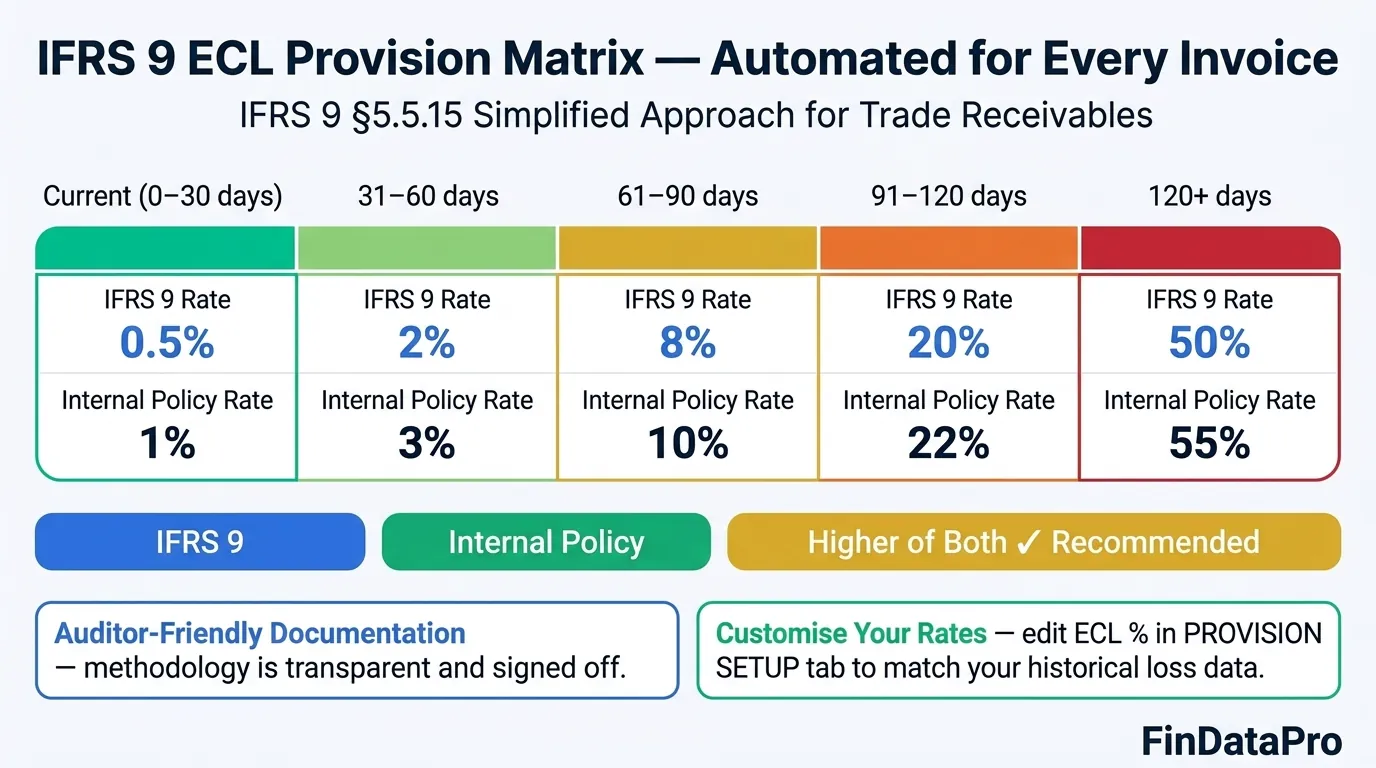
You select which method to apply: IFRS 9, Internal Policy, or Higher of Both. The Higher of Both option is recommended for IFRS-reporting entities with a strong internal policy: it is the most conservative approach and the one most auditors prefer to see documented. Every invoice is provisioned at the correct rate based on its aging bucket, rolling up into the Chase List per customer and into the Aging Summary for management accounts.
Six KPIs With Dynamic Benchmarks: Not Hardcoded Industry Averages
Most AR tools give you a static benchmark: “DSO should be below 45 days” that has nothing to do with your actual business. AR Intelligence Manager calculates every benchmark dynamically from your own portfolio composition. All six KPI benchmarks update automatically on every refresh. As your portfolio evolves, the benchmarks evolve with it.
Days Sales Outstanding (DSO)
How many days on average customers take to pay from invoice date.
Best Possible DSO
DSO if every invoice paid exactly on credit terms. The floor your collections performance is being measured against.
Collections Effectiveness Index (CEI)
Percentage of receivables that were collectible in the period, that were actually collected. Above 80% is strong for B2B portfolios.
AR at Risk %
Percentage of total outstanding that sits in aging buckets beyond your credit terms. Your early-warning signal.
Avg Days Delinquent
Average number of days past due across all overdue invoices. Tells you severity, not just frequency.
Provision Coverage %
ECL provision balance as a percentage of total AR. Below 100% on a stressed portfolio warrants a conversation with your auditors.
Why dynamic benchmarks matter: If your customer mix is 60% Government with 90-day credit terms, a DSO of 85 days is a strong result. A retail benchmark would flag it as a problem. AR Intelligence Manager shows you performance relative to what is actually achievable in your portfolio, not an irrelevant industry average.
Download AR Intelligence Manager
IFRS 9-compliant · Automated Chase List · Six-Month Forecast · AI Commentary · Built for GCC B2B finance teams.
Standard vs Power Query: Which Version Is Right for You?
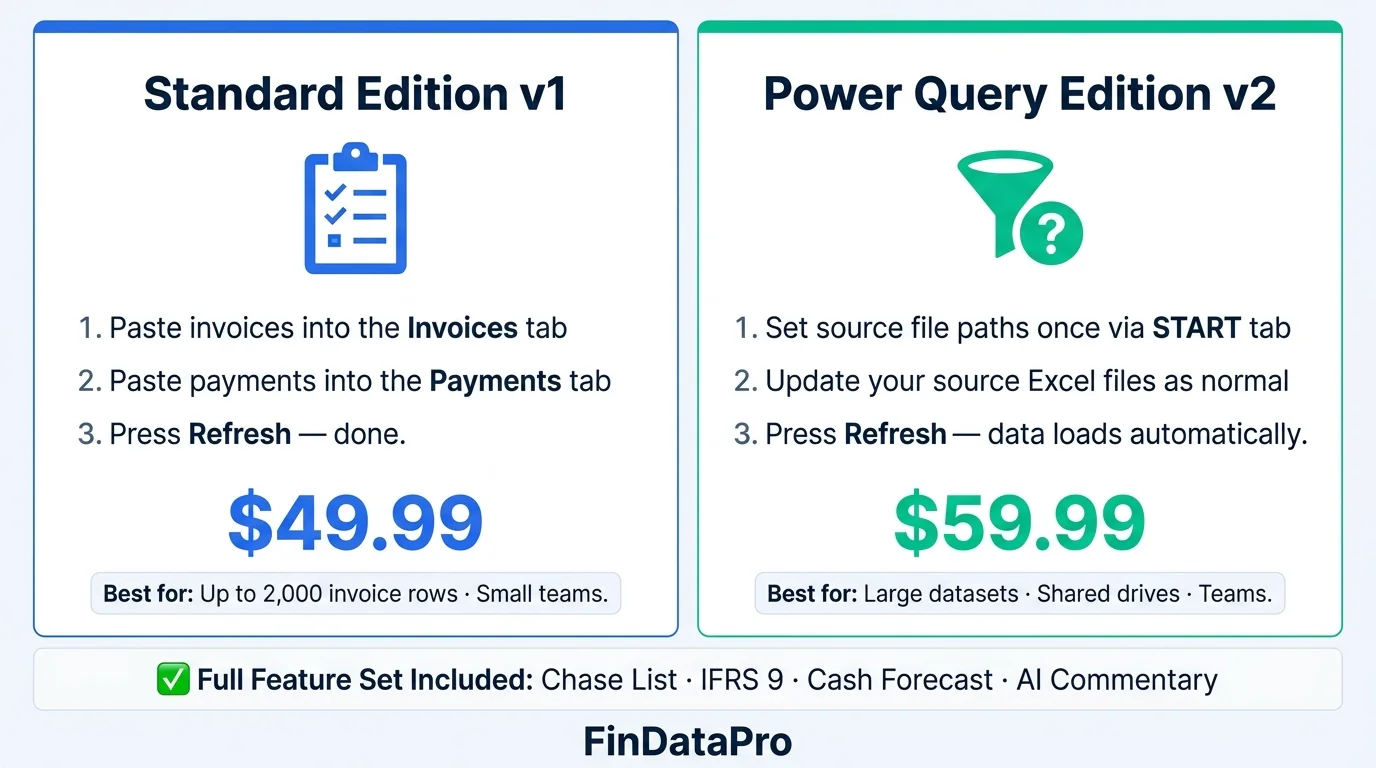
AR Intelligence Manager is available in two editions, priced differently. The difference is how your data connects to the tool. Both editions include the full feature set: Chase List, IFRS 9 provisioning, cash forecast, KPI dashboard, AI Commentary, and Monthly Snapshot.
| Feature | Standard v1: $49.99 | Power Query v2: $59.99 |
|---|---|---|
| How data enters | Paste invoices and payments directly into two tabs | Maintain separate Invoice Log + Payment Log files: tool connects automatically |
| Best for | Teams with up to ~2,000 invoice rows | Teams with larger datasets, multiple users, or shared file environments |
| Setup time | 5 minutes | 15 minutes (one-time path configuration via START tab) |
| Refresh workflow | Paste new data → press Refresh | Update source files → press Refresh |
| Power Query knowledge needed | None | None (paths configured via START tab: no PQ editing required) |
| Shared network drives | Limited | ✅ Yes: source files can sit on a shared drive |
| OneDrive / SharePoint | ✅ Yes | ✅ Yes |
| Full feature set | ✅ Included | ✅ Included |
Choose Standard v1 if:
You are setting up the tool for the first time, your team is small, or you prefer simplicity: paste, refresh, done. Ideal for finance teams with up to 2,000 invoice rows.
Choose Power Query v2 if:
You manage a high-volume AR register, share data with a team, or want a clean separation between your source data and the analytics tool. Source files can live on a shared drive or SharePoint.
Download AR Intelligence Manager
Two editions. Same powerful features. Secure checkout via Lemon Squeezy. Instant download after payment. Compatible with Microsoft Excel 2019, 2021, and Microsoft 365 (Windows).
Standard Edition
Paste your invoices and payments directly into the workbook tabs. Press Refresh. All six features activate immediately.
- Chase List + Priority Score
- IFRS 9 ECL Provisioning
- Six-Month Cash Forecast
- Six Dynamic KPI Benchmarks
- AI Commentary Tab
- Monthly Snapshot
$49.99
Download Standard EditionBest for: Up to 2,000 invoice rows · Small teams
Power Query Edition
Connect your existing Invoice Log and Payment Log files once via the START tab. Update your source files as normal. Press Refresh: data loads automatically.
- Everything in Standard Edition
- Auto-connect to source files
- Shared drive compatible
- SharePoint and OneDrive ready
- Scales to ~10,000 invoice rows
- No paste workflow needed
$59.99
Download Power Query EditionBest for: Large datasets · Teams · Shared drives
System Requirements
Excel Version
Microsoft Excel 2019, 2021, or Microsoft 365
Operating System
Windows only. Mac Excel is not supported due to Power Query limitations.
Power Query
Enabled by default in all modern Excel versions. No add-in required.
Internet Connection
Required only for the AI Commentary feature. All other features work offline.
Who Uses AR Intelligence Manager?
The tool is used by finance professionals across the GCC and wider Middle East. If your business sells on credit terms and you manage more than 20 active debtor accounts, AR Intelligence Manager will save your team hours every month.
CFOs and Finance Directors
Need IFRS 9 provisioning documentation and portfolio-level KPIs for monthly management accounts. The AI Commentary replaces the manual narrative that took a finance analyst half a day to write.
Finance Controllers and Chief Accountants
Run month-end AR processes and are asked by auditors to evidence their provisioning methodology. The provision matrix gives them a systematic, documented answer.
AR Managers and Credit Controllers
Need a prioritised collections list every week, not a flat aging report to interpret manually. The Chase List tells them exactly who to call and in what order.
Treasury Teams
Need a reliable 30 to 180-day cash collection forecast for liquidity planning. The six-month forecast gives them segment-level and customer-level expected receipts.
What Finance Teams Say
“Before this tool, our monthly AR pack took two days. Now it takes 30 minutes: refresh the data, paste the commentary into the pack, done.”
Finance Controller, Construction company, UAE
“The IFRS 9 provision matrix was the piece our auditors kept pushing back on. Now we have a systematic, documented process. No more year-end surprises.”
CFO, B2B Services, Bahrain
“The Chase List alone is worth the price. The team knows exactly who to call without any back-and-forth about priorities.”
AR Manager, Government Contracting, Saudi Arabia
Frequently Asked Questions
Do I need to know Power Query to use this tool?
No. Power Query runs behind the scenes: you never need to open or edit it. For the Standard Edition, you paste data into two tabs inside the workbook. For the Power Query Edition, you point the tool at your source files once via the START tab. After that, you only interact with Excel tables and the Refresh button.
Is this compatible with Mac Excel?
No. Power Query is not fully supported on Mac Excel. AR Intelligence Manager requires Windows Excel 2019, 2021, or Microsoft 365. A browser-based version without this limitation is in development.
Can I customise the IFRS 9 provision rates?
Yes. The PROVISION SETUP tab lets you enter your own entity-specific ECL rates for each aging bucket, plus a forward-looking macro adjustment. These are the rates your auditors should be reviewing: not the default rates, which are provided as a starting point only.
How many customers and invoices does it support?
Tested and optimised for up to 160 customers and approximately 10,000 invoice rows, which covers roughly 3 years of transaction history. For portfolios above that, an enterprise CSV folder-based architecture is available.
What AI provider do I need?
Any supported provider: Anthropic Claude, OpenAI GPT-4o, DeepSeek, Groq, Gemini, Qwen, or OpenRouter. A free-tier provider such as Groq or Gemini works for testing. For professional-quality commentary, Anthropic Claude or OpenAI GPT-4o is recommended. You supply your own API key: the tool does not charge per AI request.
What happens after I download?
You receive a single Excel workbook file (.xlsx). Open it in Excel, follow the setup instructions on the START tab, and the tool is ready. Full setup takes under 30 minutes for first-time users.
Is this compliant with IFRS 9?
The tool implements the IFRS 9 paragraph 5.5.15 simplified approach for trade receivables using a provision matrix. The methodology is documented and auditor-friendly. You remain responsible for the rates you apply and for ensuring those rates reflect your entity's historical loss data and forward-looking assumptions. Review the provision rates with your auditors at least annually.
Stop Rebuilding Your AR Report Every Month
The accounts receivable Excel template your finance team uses should produce actionable output, not formatted data. If your current process ends with someone manually deciding who to chase, manually calculating DSO, and manually writing a management commentary, the bottleneck is in the tool, not the team.
AR Intelligence Manager gives your collections team a ranked list, your CFO a documented IFRS 9 provision, your treasury team a six-month forecast, and your board a written commentary. One file. One Refresh button. Every month.
Also worth reading on FinDataPro:
- GCC VAT Bookkeeping Template: the only Excel bookkeeping template that auto-applies correct VAT rates across all 6 GCC countries.
- Prepaid Expense Amortization Schedule: daily-rate amortization engine for unlimited prepaid contracts with GL mapping.
- FILTER Function for GL Audit and AR Aging: build a live, formula-driven ageing report with FILTER instead of a static export.
- XLOOKUP for Intercompany Reconciliation: match account codes across entities that don't share a chart of accounts.
Transform Your AR Process Today
IFRS 9-compliant · Automated Chase List · Six-Month Forecast · AI Commentary
Built by a 19-year GCC finance executive for GCC B2B finance teams. One purchase, immediate download, ready to use in under 30 minutes.
Prashant Panchal is a Chartered Accountant (ACA) and Financial Modelling & Valuation Analyst (FMVA®) with 19 years of experience in finance, FP&A, and financial modelling across the GCC region. He is the founder of FinDataPro.
Have a Question About This Template?
Fill in your name and what you'd like to discuss, then hit the button to open WhatsApp.
Typically replies within a few hours during business hours (GST)
Discussion
Leave a Comment
Comments are moderated and appear once approved.