
GCC VAT Bookkeeping Template: All 6 Countries in One Excel FileThe only template that auto-applies the correct VAT rate by country: no manual input, no filing errors (2026)
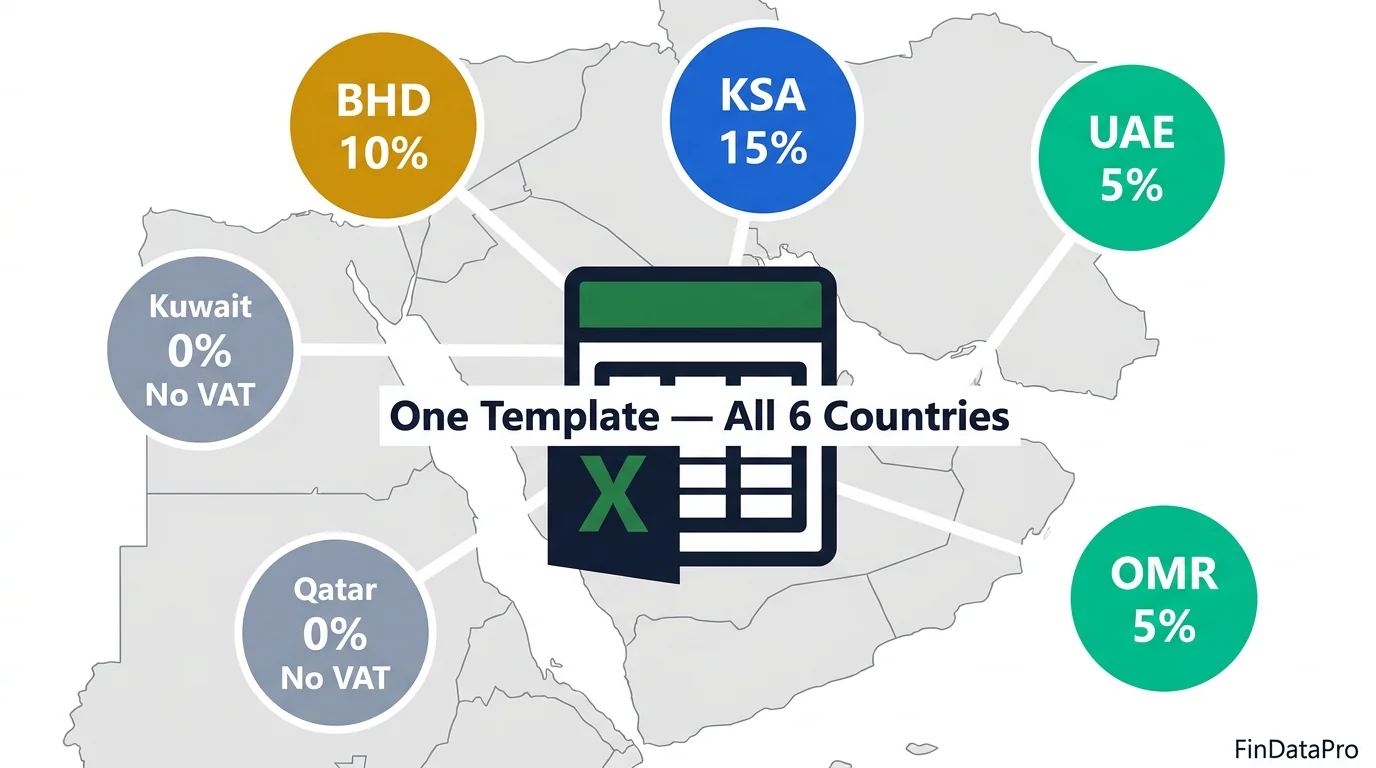
Somewhere between the introduction of UAE VAT in 2018 and Saudi Arabia's rate jump to 15% in 2020, a lot of GCC businesses quietly built a ticking compliance problem inside their Excel files.
They downloaded a generic bookkeeping template, forced it to work across multiple countries, and crossed their fingers every time a VAT return came around.
If you are managing transactions across the GCC and your current GCC VAT bookkeeping template does not automatically apply the correct rate by country, calculate input versus output VAT, and flag your refund position: you are not preparing books. You are preparing a liability.
This article walks through what a properly built GCC VAT template actually contains, how the VAT logic works across all six GCC countries, and why the gap between a generic template and a purpose-built tool costs finance teams far more than the price difference.

ACA | FMVA® | 19 Years in Finance
Why Most Bookkeeping Templates Fail GCC Businesses
The failure is not dramatic. Nobody gets audited on day one.
The problem builds slowly: the wrong VAT rate applied to a Saudi invoice, output and input VAT mixed up in the same column, a Kuwait transaction filed at 5% because someone forgot Kuwait has no VAT system. By the time the return comes around, the books look fine. The numbers add up. But they are wrong, and they stay wrong.
Generic bookkeeping templates are built for one country with one VAT rate. The UK template uses 20%. The US template does not need VAT at all. The “international” template someone found online uses a flat rate dropdown for every row. None of these was designed for a region where the VAT rate changes from 5% to 15% depending on which side of the border the invoice was raised.
The Multi-Country Problem Most Templates Ignore
Operating across UAE, Saudi Arabia, and Bahrain in the same financial year means managing three different VAT rates (5%, 15%, 10%), three different currencies (AED, SAR, BHD), and three different tax authorities: the FTA, ZATCA, and NBR, each with their own filing requirements.
The moment you try to consolidate reporting across those entities in a generic template, the architecture breaks. You end up with either one tab per country (unmanageable) or one flat ledger that treats all transactions identically (inaccurate).
A purpose-built GCC VAT bookkeeping template solves this at the structure level, not as an afterthought.
VAT Rates Across All 6 GCC Countries: What Your Template Needs to Know
Before you can build or use any GCC bookkeeping template correctly, you need the rate table embedded in the logic: not typed manually into each row. Here is the complete VAT position across the six GCC countries as of 2026.
| Country | VAT Rate | Currency | Authority | Notes |
|---|---|---|---|---|
| UAE | 5% | AED | FTA | Zero-rated: exports, education, healthcare |
| Saudi Arabia | 15% | SAR | ZATCA | Increased from 5% in July 2020. E-invoicing mandatory. |
| Bahrain | 10% | BHD | NBR | Increased from 5% in January 2022 |
| Oman | 5% | OMR | Oman Tax Authority | Implemented April 2021 |
| Kuwait | 0% | KWD | None | No VAT system implemented as of 2026 |
| Qatar | 0% | QAR | None | No VAT system; implementation expected |
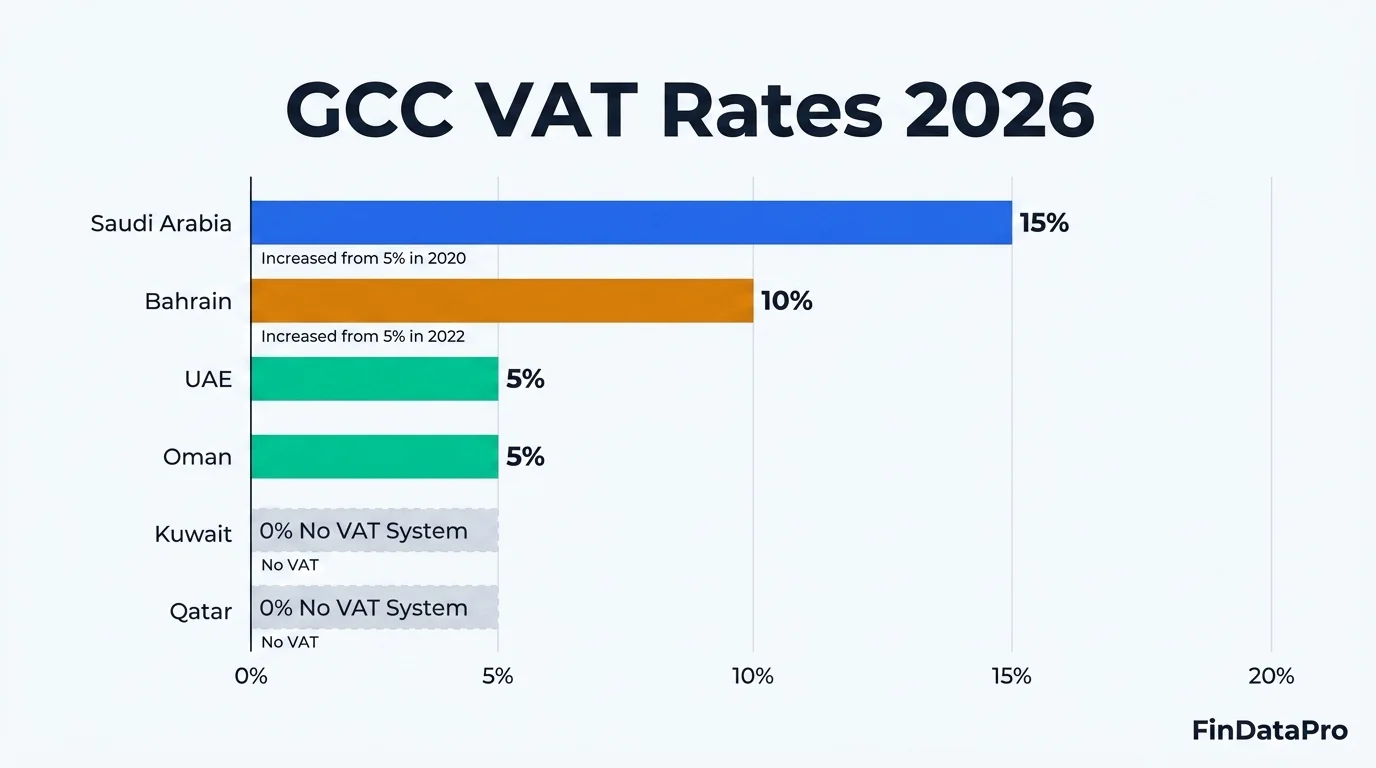
The three most common errors in GCC bookkeeping all trace back to this table:
- Applying 5% to Saudi transactions (the pre-2020 rate: still in use in outdated templates)
- Applying 5% to Bahrain transactions (the pre-2022 rate)
- Forgetting that Kuwait and Qatar operate at 0%: and filing them as exempt versus out-of-scope, which are two different treatments
Your template needs to read the category and country for every transaction and look up the correct rate automatically. If you are typing the VAT rate manually into each row, that is not a bookkeeping template. That is a manual data entry form.
What a Proper GCC VAT Bookkeeping Template Actually Contains
The GCC VAT-Ready Bookkeeping Template from FinDataPro is built on a six-sheet architecture that separates data entry from calculation, and calculation from reporting. Understanding the structure explains why it works where generic templates break.
Instructions
Full usage guide covering column logic, colour coding, and the VAT rate reference table for all six countries. Follow the instructions and the template does not let you make the common filing errors.
Dashboard and Reports
Interactive reporting hub driven by three slicers: Amount Basis, Year, and Month. Two pivot tables update live when you filter. The KPI section shows Net VAT Payable, Effective VAT Rate, and VAT Recovery Rate per country, colour-coded green, orange, or red.
ReportTable
The data model behind the Dashboard. Every transaction automatically expands into three measure rows: Amount Excluding VAT, VAT Amount, and Total Including VAT: in both source currency and home currency. You do not touch this sheet.
Transaction Log
Your single data entry point. Yellow cells only. Date, Description, Category, Country, Amount, Payment Method, Reference Number, Notes. Everything else calculates automatically.
GCC TaxRates
The lookup table that drives all VAT logic. Every Category and Country combination maps to the correct VAT rate, status (Taxed, Exempt, Zero-Rated, Out of Scope), and Transaction Type. This prevents the 5%-for-Bahrain error from ever occurring.
Categories
Dropdown source lists for Categories, Countries, and Transaction Types. Add a new category here, add its GCC_TaxRates mappings, and it populates across the entire workbook.
Download the GCC VAT-Ready Bookkeeping Template
All 6 GCC countries. Correct 2026 VAT rates. Live KPI dashboard. No VBA, no macros.
Inside the Transaction Log: Where the Numbers Live
Watch the complete template walkthrough before reading the step-by-step guide below.
Covers the Transaction Log, category and country dropdowns, auto VAT calculations, Dashboard refresh, compliance flags, and reading the VAT Analysis pivot for each GCC country.
The Transaction Log is where your bookkeeping happens. It is built as a native Excel Table (named Tran_log) that auto-expands with every new row. You enter data from Row 5 onwards.
What You Enter (Yellow Cells Only)
| Column | Field | Notes |
|---|---|---|
| A | Date | Format DD-MMM-YY. Pre-formatted. |
| B | Description | Free text. Make it searchable: “Office rent Jan 2026” beats “Rent” when reconciling months later. |
| C | Category | Dropdown. First lookup key for VAT rate. |
| E | Country | Dropdown: UAE, KSA, Bahrain, Oman, Kuwait, Qatar. Second lookup key. |
| H | Amount (Excl. VAT) | Enter the amount excluding VAT in local currency. The only numeric field you enter. |
| L | Payment Method | Bank Transfer, Credit Card, Cheque, Cash, Online Payment. |
| M | Reference No. | Invoice number or payment reference. Your audit trail starts here. |
| N | Notes | Optional: supplier name, project code, internal reference. |
What Calculates Automatically (Do Not Edit)
| Column | Field | Logic |
|---|---|---|
| D | Transaction Type | Income or Expenses: derived from Category mapping in GCC_TaxRates. |
| F | VAT Rate % | XLOOKUP from GCC_TaxRates using Category and Country as dual keys. Kuwait and Qatar always return 0%. |
| G | Currency | Auto-fills from Country (UAE = AED, KSA = SAR, Bahrain = BHD, etc.). |
| I | VAT Amount | Amount × VAT Rate. |
| J | Total Incl. VAT | Amount + VAT Amount. |
| K | VAT Type | Income = Output VAT (collected, payable to authority). Expense = Input VAT (paid, reclaimable). |
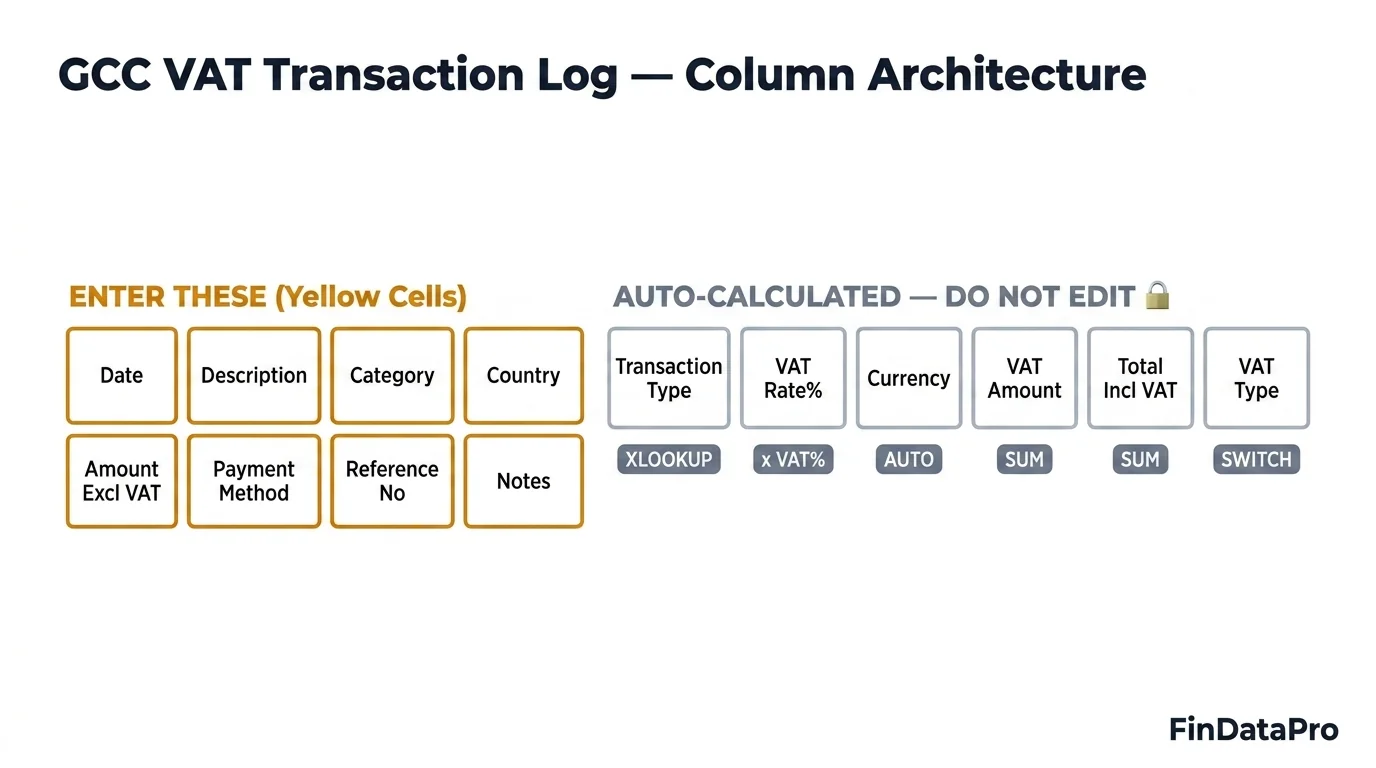
This architecture means you can enter 100 transactions without ever thinking about VAT. The logic is in the table. You put in the what (category), where (country), and how much (amount). The template does the rest.
The Dashboard: Your VAT Position at a Glance
The Dashboard is where your bookkeeping becomes decision-useful. It is not a summary of what happened: it is a live view of where you stand.
Three slicers control everything: Amount Basis (Source Currency or Home Currency), Year, and Month. Click any combination and both pivot tables, the full KPI section, and all calculated metrics update instantly. Use Data > Refresh All after adding new transactions to the log.
The Two Pivot Tables
Total VAT Analysis breaks down VAT amounts by Transaction Type, VAT Type, Category, and Measure Type, split by Country and Currency. This is your VAT return input: Output VAT Total is what you owe the tax authority, Input VAT Total is what you can reclaim, and the difference is your net position.
Amount Breakdown mirrors the same hierarchy but shows the full transaction amounts (Excluding VAT, VAT Amount, Total Including VAT). Use this for revenue and expense analysis and for management reporting.
Reading the KPI Section
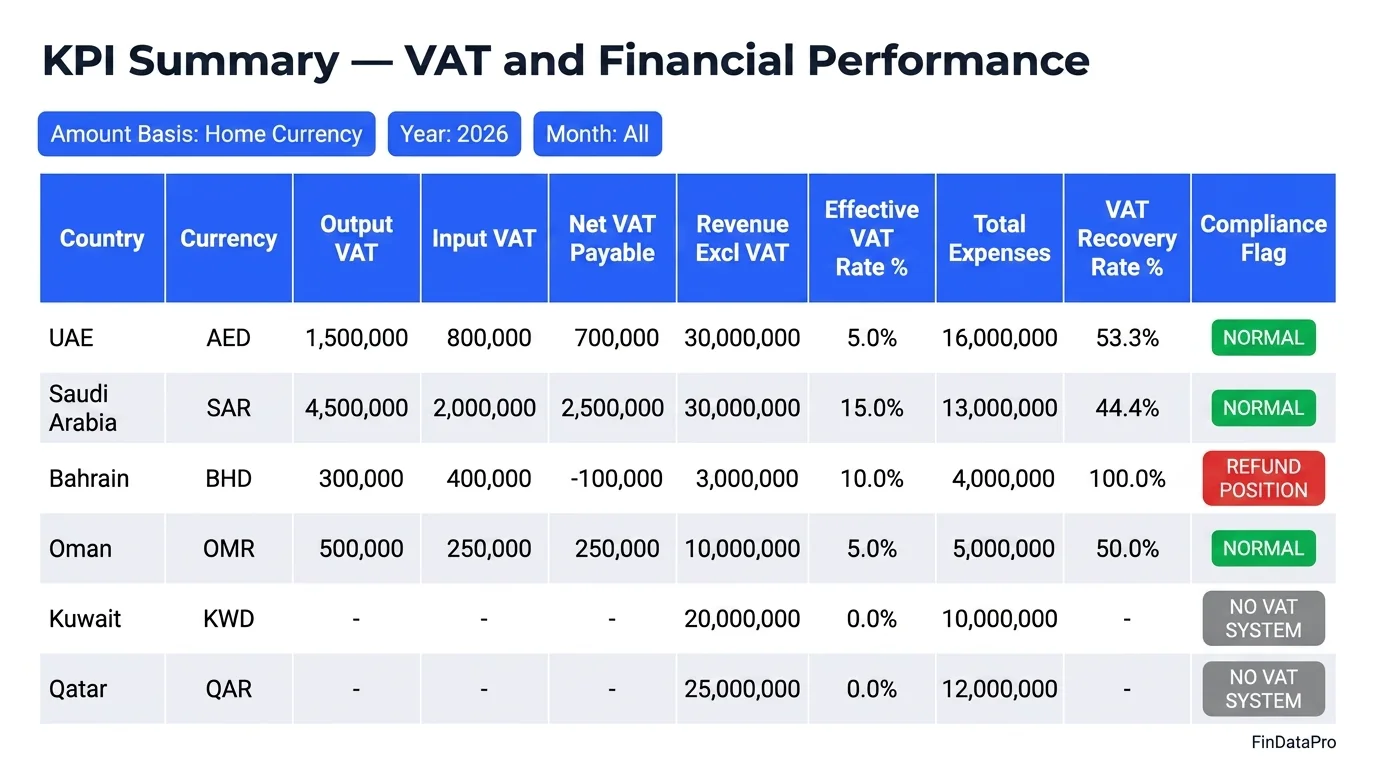
Six country rows sit below the pivot tables. Each shows:
| KPI | What It Tells You |
|---|---|
| Output VAT | Total VAT collected on income: owed to the tax authority. |
| Input VAT | Total VAT paid on expenses: reclaimable against output VAT. |
| Net VAT Payable | Output minus Input. Positive = you owe. Negative = refund position. |
| Effective VAT Rate % | Net VAT Payable ÷ Revenue. Your true VAT cost as a percentage of revenue. |
| VAT Recovery Rate % | Input VAT ÷ Output VAT. 100%+ means full recovery or refund position. Below 50% warrants investigation. |
| Compliance Flag | Automated per country: NORMAL, REFUND POSITION, HIGH VAT BURDEN, or NO VAT SYSTEM. |
Compliance Flags: Output VAT, Input VAT, and the Refund Position
The Compliance Flag removes the need to mentally calculate where you stand before each filing. There are four possible flags:
NORMAL (green)
Healthy VAT position. Net VAT is positive and Effective VAT Rate is below 10%. You owe the tax authority, the amount is proportionate to revenue, and there are no obvious structural issues.
REFUND POSITION (red)
Input VAT exceeds Output VAT. The tax authority owes you money. Common in trading companies with high input purchases, or businesses with significant export revenue (zero-rated sales with fully reclaimable input VAT). Do not ignore a red flag: file your refund claim.
HIGH VAT BURDEN (orange)
Effective VAT Rate has exceeded 10%. You are paying a disproportionate amount of VAT relative to revenue. This typically signals low input credit recovery: either exempt revenue streams preventing full input reclaim, or input VAT not captured at transaction level. Both require investigation before the next filing.
NO VAT SYSTEM (grey)
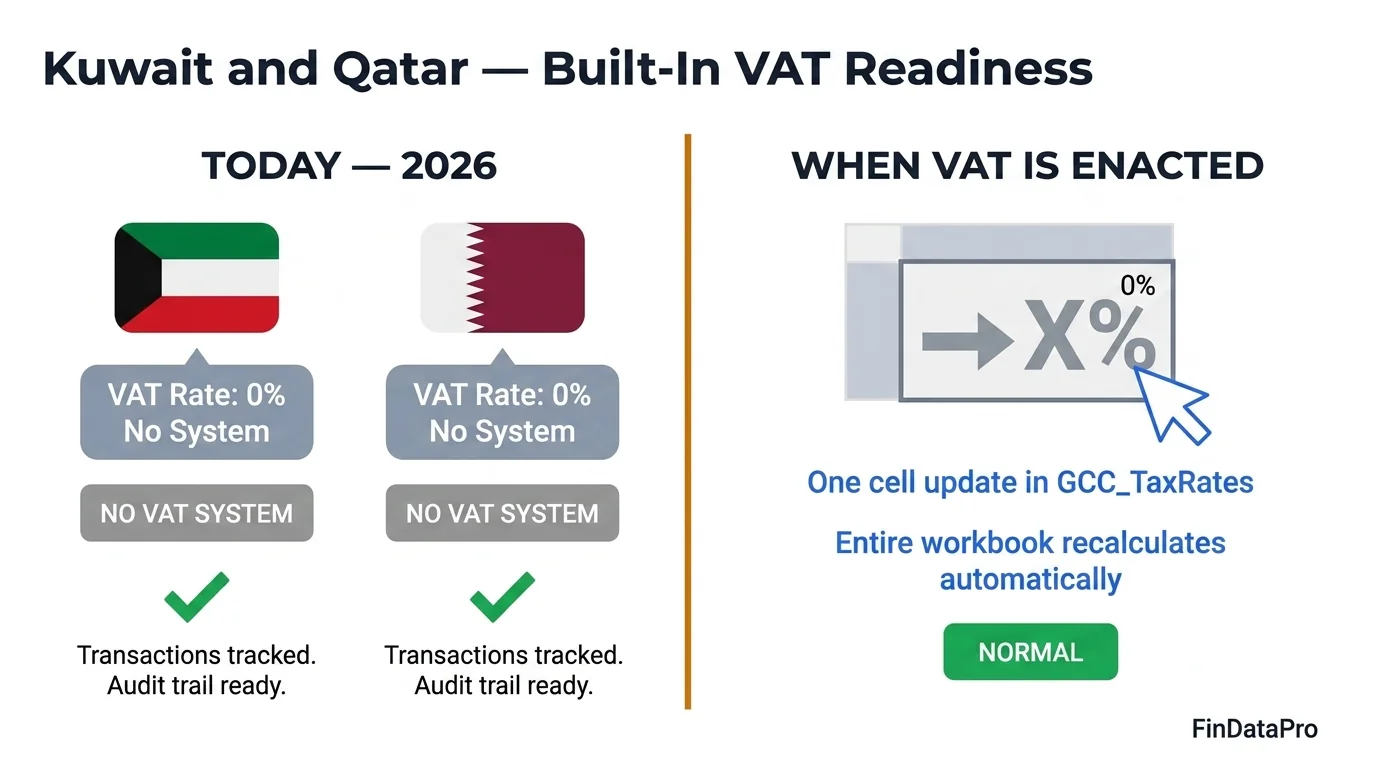
Kuwait and Qatar. No VAT legislation in force. All transactions record at 0%. The flag is informational only. The template is structured to accommodate a VAT rate for these countries the moment legislation is enacted.
Why the Effective VAT Rate Matters
The Effective VAT Rate is a second-order indicator that most basic templates never calculate.
A business with AED 5,000,000 in revenue and AED 250,000 in net VAT payable has an Effective VAT Rate of 5%: exactly at the standard rate, which makes sense for a business with taxed revenue and reclaimable input costs. If that same business shows 4%, input credits are working. If it shows 4.8%, there is likely some exempt revenue or missed input claims reducing recovery. The number tells you something. Most templates never compute it.
Multi-Currency Consolidation: Reporting in Your Home Currency
Running operations across three or four GCC countries means your transactions are split across AED, SAR, BHD, and OMR. Comparing performance across countries in local currencies without conversion is not analysis: it is organised data.
The Dashboard solves this with the Home Currency selector. In cell B5 on the Dashboard, select your preferred reporting currency: USD, AED, SAR, BHD, or any other. The Amount Basis slicer then controls whether the pivot tables show Source Currency (local, useful for individual country filing) or Home Currency (converted, useful for group-level analysis and board reporting).
All conversions run through the ReportTable's embedded exchange rate logic: no manual currency conversion required. This is the feature that makes the template genuinely useful for multi-entity GCC businesses. Most bookkeeping templates either ignore currency entirely or require you to build a conversion layer manually.
Kuwait and Qatar: Why You Still Need to Track Them
The instinct when you see “0% VAT: No system” for Kuwait and Qatar is to exclude them from your bookkeeping workflow, or track them in a separate file. Resist that instinct.
Tracking Kuwait and Qatar transactions through the same template gives you three things. First, consolidated revenue visibility: your total GCC revenue picture is incomplete if two countries are tracked separately. Second, readiness for legislative change: both Kuwait and Qatar have discussed VAT implementation. When the rate is enacted, you update one row in GCC_TaxRates and the entire workbook recalculates. You do not rebuild your bookkeeping system. Third, payment method and reference number audit trails: even zero-VAT transactions need documentation for cash flow management, supplier terms, and internal audit purposes.
The grey NO VAT SYSTEM flag is not a reason to exclude. It is a placeholder for what is coming.
How to Use This Template for Your VAT Return Preparation
The template does not file your VAT return for you. What it does is give you every number you need, in the correct format, before you open your FTA, ZATCA, NBR, or Oman Tax Authority filing portal.
Enter all transactions for the period
Use yellow cells only. Date, Description, Category, Country, Amount excluding VAT. Reference numbers are optional but strongly recommended for audit trail.
Refresh the Dashboard
Right-click any pivot table and select Refresh All. The KPI section updates automatically.
Set the slicer to your filing period
Select Year and Month (or leave Month as All for a quarterly return). Set Amount Basis to Source Currency.
Read the VAT Analysis pivot for the relevant country
Output VAT Total is your output tax liability. Input VAT Total is your input tax credit. Net VAT Payable is the figure that goes on your return.
Check the Compliance Flag
NORMAL: proceed. REFUND POSITION: prepare your refund claim documentation. HIGH VAT BURDEN: review input credit claims before filing.
Use the Amount Breakdown pivot for supporting schedules
If the tax authority requests a breakdown by category, you have it ready.
Export the Dashboard as your VAT workpaper
Attach to your return records for audit purposes. The entire preparation process: from opening the file to having all figures ready: takes under 30 minutes for a business with clean transaction data.
The template cannot fix missing receipts or uncoded transactions. What it eliminates is the recalculation layer. If your current process takes longer than 30 minutes, the bottleneck is upstream of the template: not in the tool itself.
Frequently Asked Questions: GCC VAT Bookkeeping Template
What VAT rates does this GCC bookkeeping template cover?
The template covers all six GCC countries: UAE (5%), Saudi Arabia (15%), Bahrain (10%), Oman (5%), Kuwait (0%), and Qatar (0%). Rates auto-fill based on the country you select: you never type a VAT rate manually. Kuwait and Qatar are included at 0% with a No VAT System flag, and the template updates automatically when either country enacts VAT legislation.
Does this template work if I operate in only one GCC country?
Yes. You select the country on each transaction row and the template applies the correct logic for that country only. If you are UAE-only, every transaction uses AED and 5% VAT (or 0% for exempt and zero-rated categories). The multi-country architecture adds zero complexity for single-country users.
Does the template handle Saudi Arabia's e-invoicing (FATOORAH) requirement?
The template is a bookkeeping and VAT calculation tool, not an e-invoicing system. It handles transaction recording and VAT calculation for KSA at the correct 15% rate. FATOORAH compliance requires a ZATCA-certified e-invoicing platform for invoice generation and submission. This template is your back-office record, not the front-end invoicing tool.
What is the difference between zero-rated and exempt transactions?
The GCC_TaxRates sheet distinguishes between Taxed, Exempt, Zero-Rated, and Out of Scope for every Category and Country combination. Zero-Rated transactions (such as export sales in UAE) record at 0% VAT but remain in the Output VAT column: they are VAT reportable. Exempt transactions (such as residential rent in UAE) are excluded from the VAT calculation entirely. This distinction directly affects your Input VAT recovery rate.
Does this template require macros or VBA?
No. The template uses pure Excel formulas: XLOOKUP, SWITCH, SUMIFS, and GETPIVOTDATA. No VBA, no macros, no add-ins. It runs on Excel 2019 and later on any device. No security warnings, no Enable Content prompts.
Can I add new transaction categories?
Yes. Add the new category to the Categories sheet (Income or Expense column), then add one row per country to GCC_TaxRates with the correct VAT rate, status, and transaction type. The new category appears in the dropdown on the Transaction Log and calculates correctly from that point.
What is VAT Recovery Rate and why does it matter?
VAT Recovery Rate is Input VAT divided by Output VAT. It measures how much of the VAT you pay on purchases you recover through your input credit claims. A rate below 50% typically signals either significant exempt revenue or under-claimed input VAT. For a trading business with fully taxed revenue and standard input costs, you should expect 80% or above. The template calculates this automatically per country in the KPI section.
Is this template compliant with IFRS-based bookkeeping requirements?
The template is a transactional bookkeeping and VAT tracking tool, not a full accounting system. It does not post journal entries or maintain a general ledger. For IFRS-compliant financial statements, your transactions will need to be entered into an accounting system (QuickBooks, Xero, Zoho Books, or an ERP). This template gives you clean, categorised, VAT-calculated transactional data that is straightforward to import or reconcile against your accounting system records.
Stop Filing GCC VAT Returns on a Template Built for One Country
The VAT rate in Saudi Arabia is not 5%. It has not been 5% since July 2020. Bahrain moved to 10% in January 2022. If you are still using a template that does not know the difference, or does not look up the rate automatically, the error is not in the filing. It is in the architecture.
A proper GCC VAT bookkeeping template removes the manual layer between a transaction and the correct VAT calculation. When the country determines the rate and the category determines the treatment, you stop making the errors that create filing adjustments, audit queries, and late-night reconciliations before a return deadline.
Your action plan:
- Download the template: All 6 GCC countries, correct 2026 rates, built-in compliance flags. Available on FinDataPro via Lemon Squeezy.
- Enter your transactions for the current period: Yellow cells only. Date, Description, Category, Country, Amount. The VAT logic handles itself.
- Refresh the Dashboard: Check your Net VAT Payable and Compliance Flag before opening the FTA or ZATCA portal.
- File with confidence: Your output tax, input credit, and effective rate are already calculated. The only thing left is the submission.
The GCC regulatory environment is not getting simpler. E-invoicing in Saudi Arabia. Corporate tax in UAE. Expected VAT in Qatar. Every quarter there is more to track, more to reconcile, and more to get wrong. The businesses that get ahead of this build the right infrastructure early: not the most complex software, but clean, structured, accurate records.
Also worth reading:
- The complete guide to depreciation methods: for GCC fixed asset accounting alongside your VAT records
- Free Excel resources for finance professionals on FinDataPro
Get the GCC VAT-Ready Bookkeeping Template
Built by a 19-year GCC finance executive. All six countries. Correct 2026 VAT rates.
No VBA, no macros, no dependencies. One purchase, immediate download, ready to use today.
Download on FinDataProPrashant Panchal is a Chartered Accountant (ACA) and Financial Modelling & Valuation Analyst (FMVA®) with 19 years of experience in finance, FP&A, and financial modelling across the GCC region. He is the founder of FinDataPro.
Have a Question About This Template?
Fill in your name and what you'd like to discuss, then hit the button to open WhatsApp.
Typically replies within a few hours during business hours (GST)
Discussion
Leave a Comment
Comments are moderated and appear once approved.