
Automated Bank Reconciliation for GCC Finance Teams(2026)
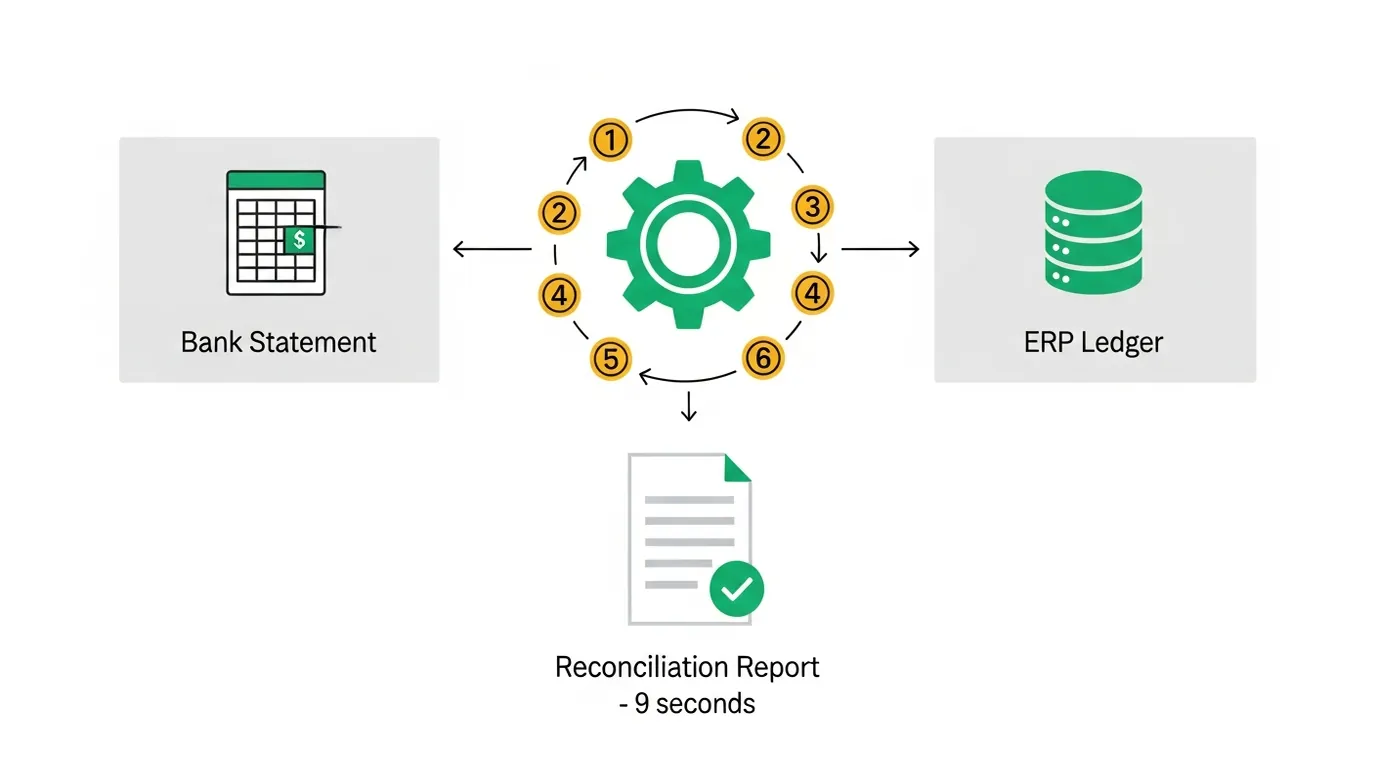
If your team is still reconciling bank statements manually, copying lines, writing VLOOKUPs, highlighting mismatches you are spending two to eight hours every month on a task that automated bank reconciliation can finish in under ten seconds.
I have seen the numbers across enough GCC finance teams to know this is not an exaggeration. This post walks through how automated bank reconciliation works, why GCC teams face specific challenges that generic tools ignore, and how AutoBankRec handles all of it from FAWRI+ payment batches to WPS salary runs to SWIFT timing differences without writing a line of code.

ACA | FMVA® | 19 Years in Finance
The Hidden Cost of Manual Bank Rec
Most finance teams underestimate what manual bank reconciliation actually costs. It is not just the hours your accountant spends matching lines. It is the compounding effect of the errors they miss.
An unmatched item carried forward becomes a query in next month audit pack. A duplicate ERP entry left undetected inflates your payables. A bank charge not posted in the ledger creates a silent difference that someone spends three hours tracing six weeks later during the external audit.
Across GCC finance teams I have worked with, the number is consistent: two to four hours per account per month for a busy corporate bank account with 300 to 600 transactions. That works out to 24 to 48 hours per year per account on a task that is ultimately mechanical.
The question is not whether to automate. It is how.
What Is Automated Bank Reconciliation?
Automated bank reconciliation means using software to systematically compare a bank statement against your accounting system bank ledger. It matches transactions, identifies differences, and produces a formatted reconciliation report without manual intervention.
At its core, the engine takes two data sources and applies a series of matching rules. Exact date-and-amount matches go first. Then fuzzy matches with the same amount but slight date or description variation. Then grouped matches where multiple ERP lines sum to one bank batch. Then timing matches where the amount is the same but posting dates differ because of clearing delays.
The output is not just a list of matched pairs. It is a complete audit-ready reconciliation statement. Both sides adjusted to a true cash balance. The reconciling difference calculated. Every unmatched item classified with a recommended action.
Why GCC Finance Teams Face a Unique Challenge
Generic bank reconciliation tools are built for Western payment systems. ACH, BACS, cheques. They do not know what FAWRI+ is. They cannot handle a WPS salary run where the bank shows one consolidated debit and your TallyPrime shows 87 individual employee entries. They treat a ZATCA tax payment the same as any other outflow with no contextual classification.
GCC finance teams deal with a set of payment instruments that need regional intelligence built into the matching engine:
- FAWRI+ and Fawri
Bahrain real-time interbank transfer. Bank references (FAWRI-30004) rarely match ERP voucher numbers (PV-2004). The engine matches on amount, date, and description similarity.
- WPS (Wage Protection System)
Mandatory across all GCC countries. Bank shows one consolidated salary debit. ERP holds individual employee vouchers. A one-to-many grouping algorithm is required.
- BenefitPay
Bahrain mobile payment platform. Batch settlements aggregate multiple individual transactions that need to be split.
- SWIFT and TT Transfers
Cross-border payments arrive at the bank one to five days after the ERP booking date. A matching engine without a timing tolerance window leaves every SWIFT transfer unmatched.
- ZATCA, NBR, GOSI
Tax and social insurance payments to government authorities need specific classification so they land correctly on the ERP-side adjustment, not the bank side.
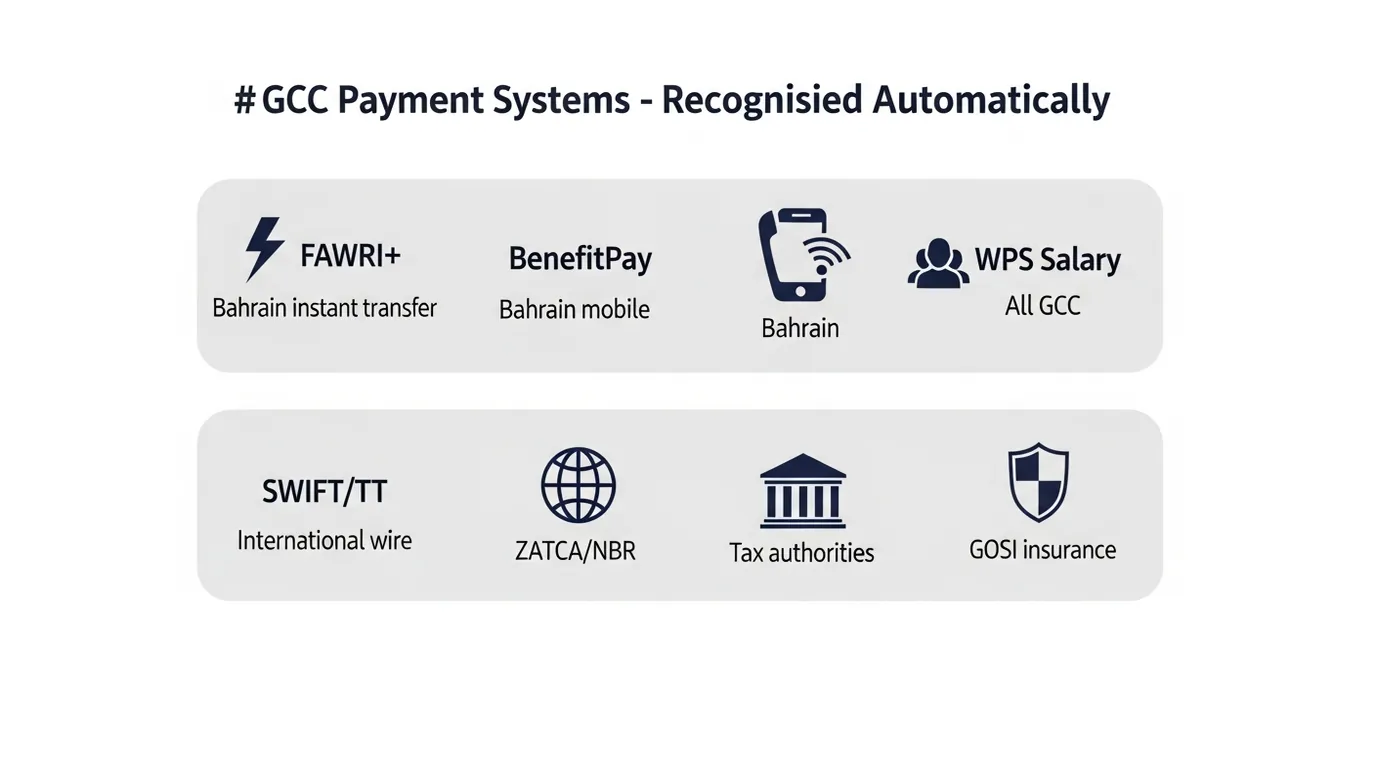
Without this regional intelligence built into the engine, an automated tool will produce the same unmatched rate as doing it manually. Just faster.
How FinDataPro AutoBankRec Works
AutoBankRec runs inside Claude Cowork, the desktop AI tool that comes with a Claude Pro subscription. There is no software to install and no IT department to involve.
The entire monthly workflow is three steps:
Step 1: Fill the Bank Statement Template
Paste your bank transaction export into the standardised template. Header fields take 60 seconds. Transaction data is a straight paste from your bank CSV export.
Step 2: Fill the ERP Bank Book Template
Export your bank ledger from TallyPrime, QuickBooks, Zoho Books, SAP, or any other system and paste it into the ERP template. Opening balances must match. Voucher types should be populated for correct classification.
Step 3: Tell Cowork to Reconcile
Open Claude Cowork and type: "Reconcile the bank statement for January 2026, the files are in the folder." That is the entire instruction. Cowork reads both templates, runs the full matching engine across six passes, and saves a formatted Excel report to your connected folder.
The Six-Pass Matching Engine
The matching engine runs six passes in sequence. Each pass is designed to catch a different category of match:
| Pass | Method | What It Catches |
|---|---|---|
| 1 - Exact | Same date, same amount, best reference similarity | Clean 1:1 matches. Typically 50-70% of all transactions. |
| 2 - GCC Pattern | WPS batches, BenefitPay settlements, FAWRI+ groups | Regional payment patterns. Many-to-one. |
| 3 - Fuzzy | Same amount, +-3 days, description similarity at least 65% | Minor date or description differences. |
| 4 - Many:1 | Multiple ERP entries summing to one bank entry | Aggregated payments split in the ERP. |
| 4b - 1:Many | Multiple bank entries summing to one ERP entry | Bank splits a consolidated ERP posting. |
| 5 - Timing | Same amount, +-7 days, strong description match | SWIFT and TT clearing delays. Cross-border transfers. |
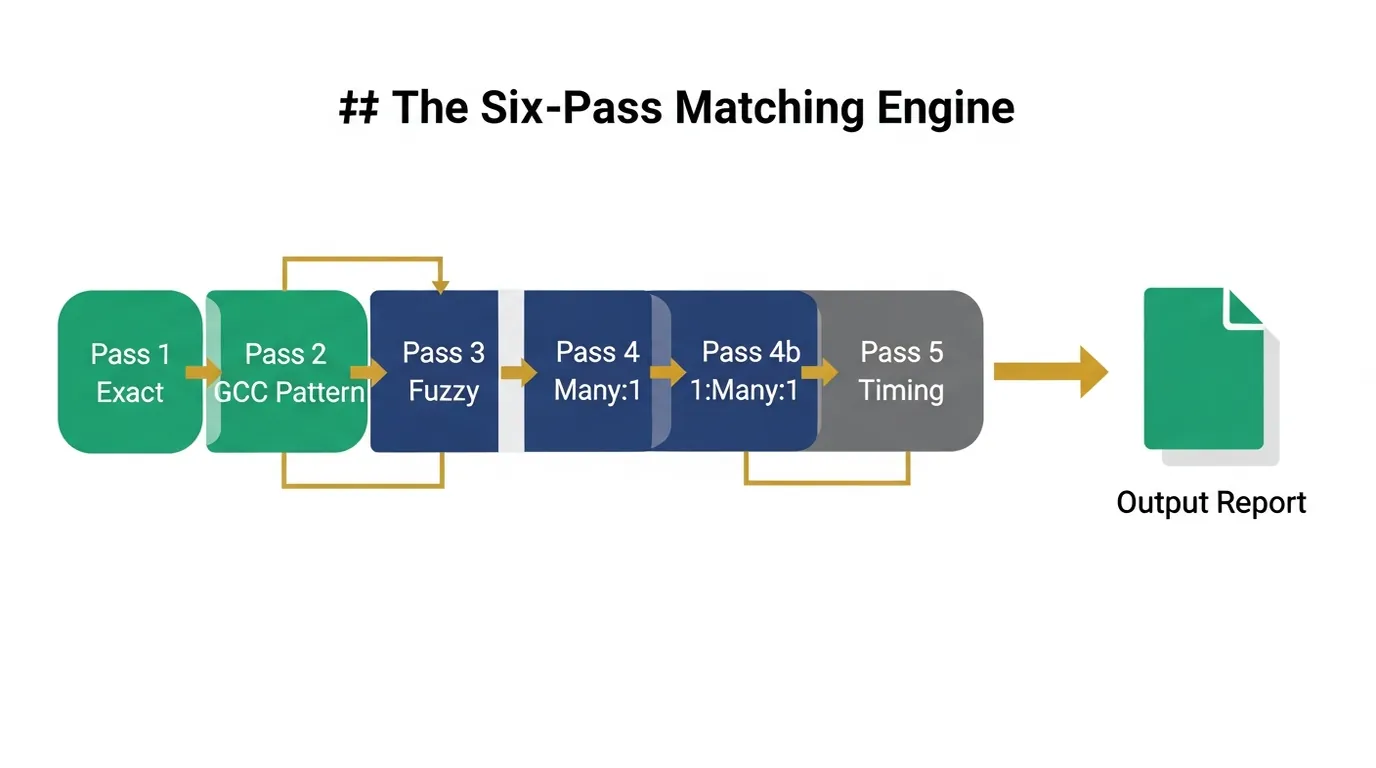
After all six passes, unmatched items are classified automatically. Bank-only items get a recommended journal entry action. Interest income, bank charges, FAWRI payments, WPS entries not yet posted. ERP-only items are split between outstanding payments to carry forward and errors or duplicates to reverse.
What Your Output Looks Like
Every reconciliation run produces one Excel file, automatically named and timestamped, with four tabs:
The official reconciliation statement. ERP closing balance adjusted to true cash. Bank closing balance adjusted to true cash. Reconciling difference calculated automatically. Green when zero, red if anything remains unresolved. This is the tab you print and sign.
Every matched transaction pair, colour-coded by match type. Green for exact, blue for fuzzy, yellow for many-to-one, purple for timing. Any row with a flag needs a human check.
Unmatched bank transactions with GCC pattern classification and a recommended journal entry for each item.
Unmatched ERP entries split by voucher type. Outstanding payments to carry forward versus errors and duplicates to reverse.
The Rec Summary tab also includes a full timing block at the bottom showing how long each pass took, total elapsed time, first pass time, and cumulative time if corrections were needed.
Real Performance Benchmarks
These are production run results, not theoretical estimates:
| Dataset | Bank Transactions | ERP Transactions | Total Time |
|---|---|---|---|
| Small account | 403 | 595 | 5.11 seconds |
| Busy account | 500 | 1,110 | 9.37 seconds |
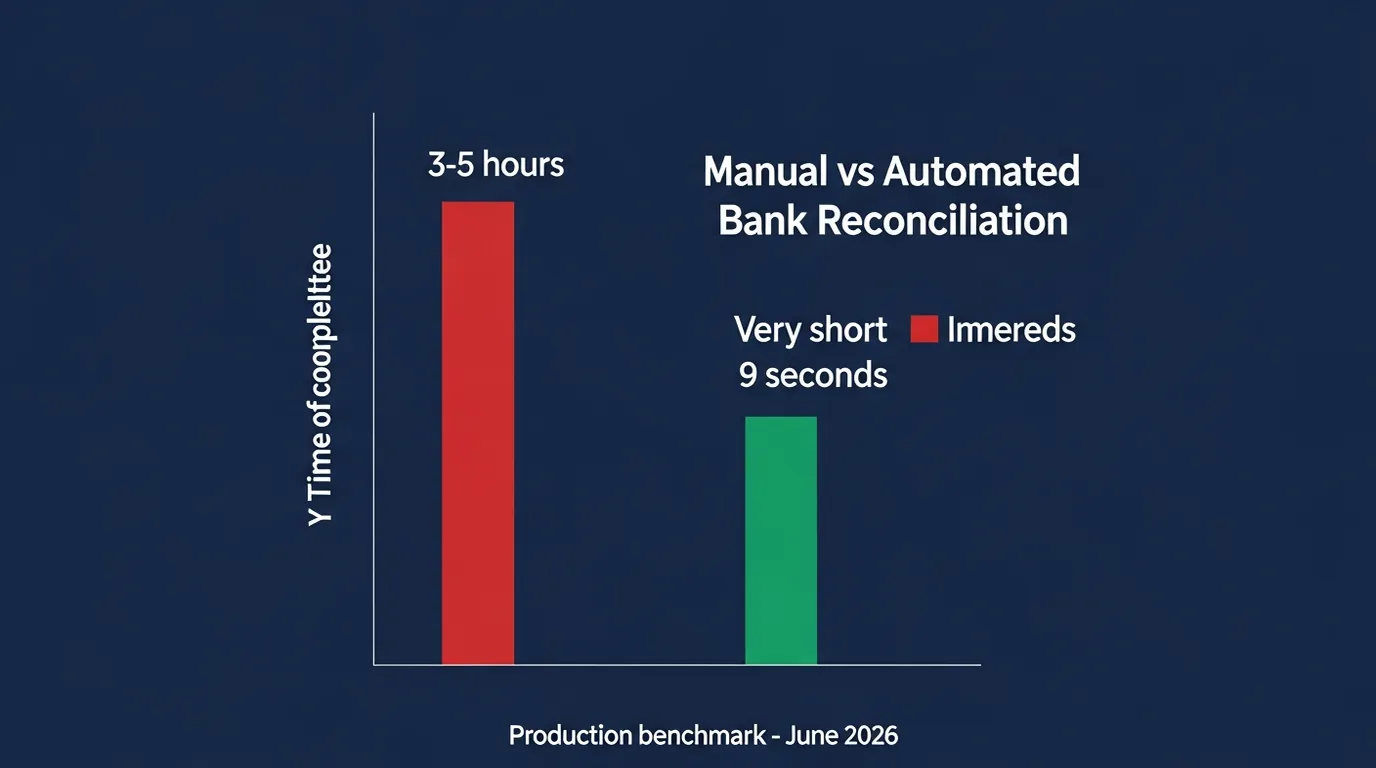
For context, the same 500-transaction dataset takes an experienced accountant roughly three to five hours to reconcile manually. The automation saves over 99 percent of the time.
Who Should Use This
AutoBankRec is designed for any finance professional who prepares or reviews monthly bank reconciliations:
- Controllers and Senior Accountants
Primary operators. Prepare templates, run the engine, clear exceptions.
- CFOs and Finance Directors
Run it yourself on the laptop. Review the Rec Summary. Sign off in minutes.
- Finance Consultants (GCC)
Use it for client engagements. Deliver a professional output in minutes instead of hours.
- External Auditors
The output structure is designed for audit review. The Matched Items tab provides full matching evidence.
The only requirements are a Claude Pro subscription with Cowork enabled and Microsoft Excel to fill the templates and open the output. No Python, no technical background, no IT support needed.
Download FinDataPro AutoBankRec v2.0
Automated bank reconciliation for GCC finance teams. Includes the Cowork skill, both Excel templates, sample data for testing, and the complete user guide.
Get the PackageHow to Get Started Today
Getting AutoBankRec running takes less than 15 minutes the first time:
1. Download the Package
Includes the skill file, both Excel templates, sample data for testing, and the complete user guide.
2. Install the Skill
Open Cowork, go to Settings, Install Skill, select the file. One time only.
3. Connect Your Folder
Point Cowork to the folder where your templates will live. All output files save here automatically.
4. Run a Test
Use the sample data included in the package. Confirm your output matches the Answer Key. Then go live with real data.
Frequently Asked Questions
What is automated bank reconciliation and how does it work?
It is the process of using software to compare a bank statement against an accounting system bank ledger, match transactions, and produce a reconciliation report without manual intervention. AutoBankRec does this in under 10 seconds by running six sequential matching passes: exact match, GCC payment pattern grouping, fuzzy match, many-to-one grouping, one-to-many grouping, and timing-based matching. The output is a four-tab Excel report with a completed reconciliation statement.
Do I need to know how to code to run this?
No. AutoBankRec runs inside Claude Cowork, which you access through the Claude desktop app. You fill two Excel templates with your bank and ERP data, type an instruction to Cowork, and your report is ready. There is no command line, no Python installation, and no technical background required.
Which GCC payment systems does AutoBankRec recognise?
The engine handles FAWRI+ and Fawri (Bahrain instant transfers), BenefitPay (Bahrain mobile payments), WPS salary runs (all GCC countries), SWIFT and TT international transfers, ZATCA and NBR tax settlements (Saudi Arabia and Bahrain), and GOSI social insurance payments (Saudi Arabia). All classified automatically with no manual tagging required.
How accurate is the matching?
In production testing with real GCC transaction data, the engine matches 70 to 90 percent of bank transactions automatically across the six passes. The remaining 10 to 30 percent are genuine exceptions that require human review. Bank charges not posted in ERP. Outstanding cheques not yet cleared. Duplicate entries. Every unmatched item is classified with a recommended action so even the exceptions are handled efficiently.
What ERP systems does this work with?
Any system that can export bank ledger data to Excel. Tested and documented for TallyPrime, QuickBooks, Zoho Books, SAP, Oracle Financials, Microsoft Dynamics, and Odoo. You paste the export into the standardised ERP template. Column mapping takes five minutes the first time and then it is the same every month.
What if I need to run the reconciliation more than once?
Each run creates a new timestamped output file. A timing log tracks every run for the same company and period, recording the first pass time separately from the cumulative total. If you fix a data issue and rerun, you always know the true time invested. The reconciliation statement is fully recalculated on every run.
Your Bank Rec Should Never Take More Than 10 Minutes Again
Automated bank reconciliation is not a future capability. It is running today, built specifically for GCC payment systems, and completing in under 10 seconds on accounts with over 1,000 transactions.
The manual approach of highlighting cells and writing VLOOKUPs is not just slow. It is a source of recurring errors that compound month after month. The automated approach matches faster, flags anomalies more consistently, and produces an audit-ready report that any controller or CFO can sign off on with confidence.
Available for Claude Cowork Pro subscribers. Single-user licence.
Prashant Panchal is a Chartered Accountant (ACA) and Financial Modelling & Valuation Analyst (FMVA®) with 19 years of experience in finance, FP&A, and financial modelling across the GCC region. He is the founder of FinDataPro.
Discussion
Leave a Comment
Comments are moderated and appear once approved.