
PMT, IPMT, PPMT Explained: Automating Loan and Lease Amortisation Schedules
Build a full loan or lease amortisation schedule in Excel with PMT, IPMT, and PPMT, verified against a real 5-year, 300,000 loan example.

ACA | FMVA® | 19 Years in Finance
A fixed loan payment looks deceptively simple: the same number, every month, for the life of the loan. What most people building a schedule by hand get wrong isn't the payment itself, it's the split between interest and principal buried inside it, which changes every single month even though the payment doesn't. Get that split wrong and your GL postings misstate interest expense, your balance sheet carries the wrong loan balance, and the error compounds silently for the life of the loan. PMT, IPMT, and PPMT are three purpose-built functions that calculate the payment and its split correctly, every time, without you tracking the running balance by hand.
This guide builds a complete amortisation schedule for a real loan, verifies the maths behind it, and shows how to generate the whole thing with SEQUENCE instead of dragging a formula down 60 rows.
Three Functions, One Payment
Every period of a standard amortising loan has one fixed total payment, split into two components that shift every period: the interest charged on the outstanding balance, and the principal that actually reduces that balance. Three Excel functions map directly onto this structure:
PMT calculates the fixed total payment for the life of the loan. IPMT calculates the interest portion of the payment for any specific period. PPMT calculates the principal portion of the payment for any specific period.
All three take the same core arguments, rate, number of periods, present value, which means once you've set up one, the other two are a small variation, not a separate calculation from scratch.
What Each Function Actually Returns
Per Microsoft's official PMT function reference:
=PMT(rate, nper, pv, [fv], [type])
=IPMT(rate, per, nper, pv, [fv], [type])
=PPMT(rate, per, nper, pv, [fv], [type])
IPMT and PPMT add one argument PMT doesn't need: per, the specific period you're calculating for. This is the piece that makes them period-aware, IPMT for period 1 and IPMT for period 30 return genuinely different figures on the same loan, because the outstanding balance (and therefore the interest charged on it) is different at each point.
The Scenario: A 5-Year Equipment Loan
Consider a fictional equipment loan for Meridian Group: 300,000 borrowed, a 7% annual interest rate, repaid in equal monthly instalments over 5 years (60 months).
| Loan Parameter | Value |
|---|---|
| Principal (PV) | 300,000 |
| Annual rate | 7% |
| Monthly rate | 7% ÷ 12 = 0.5833% |
| Term | 60 months |
Step 1: Calculating the Fixed Monthly Payment With PMT
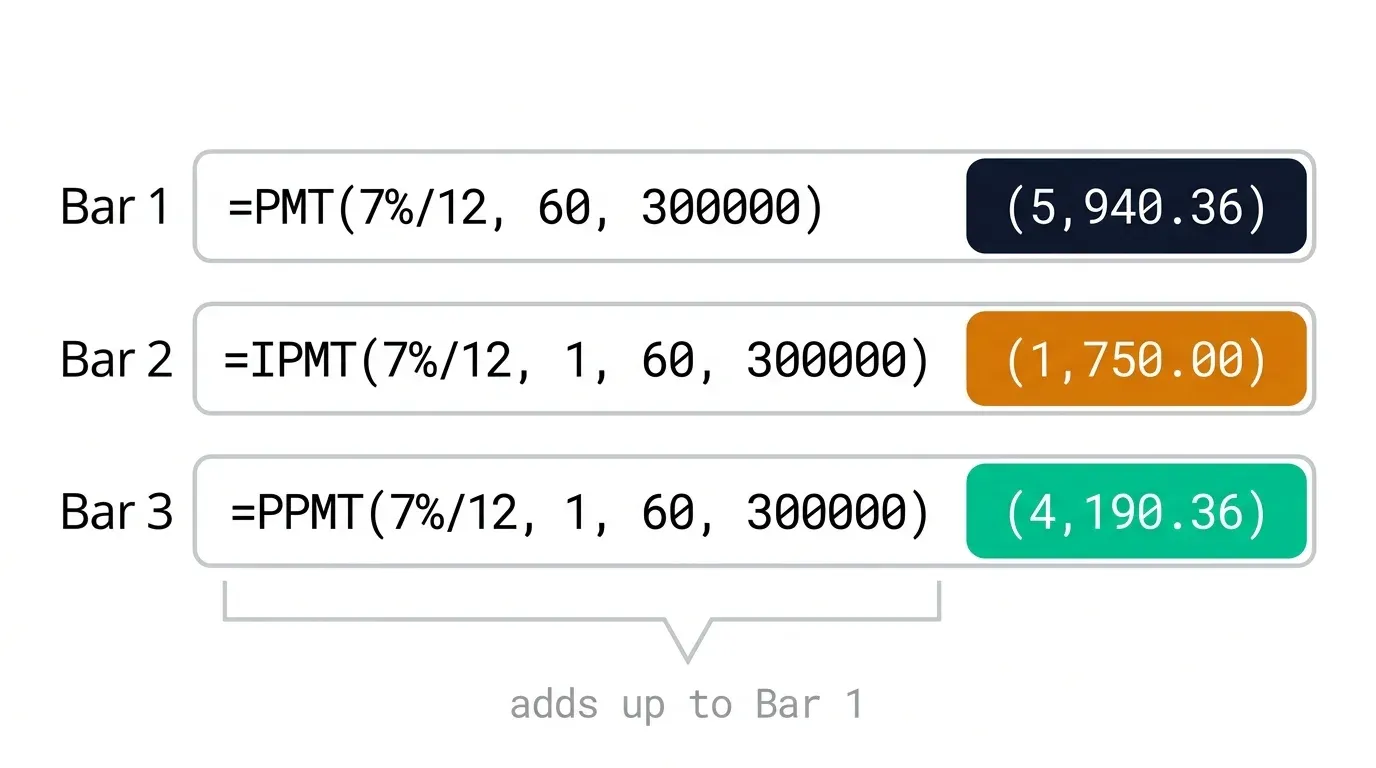
=PMT(0.07/12, 60, 300000)
This returns (5,940.36), the fixed payment due every month for all 60 months of the loan. Excel returns this as a negative figure by convention, representing a cash outflow; wrapping the formula in a negative sign, or simply reading it as a payment amount, are both standard practice depending on how the rest of your model is signed.
Step 2: Splitting Interest and Principal With IPMT and PPMT
For month 1:
=IPMT(0.07/12, 1, 60, 300000)   → (1,750.00)
=PPMT(0.07/12, 1, 60, 300000)   → (4,190.36)
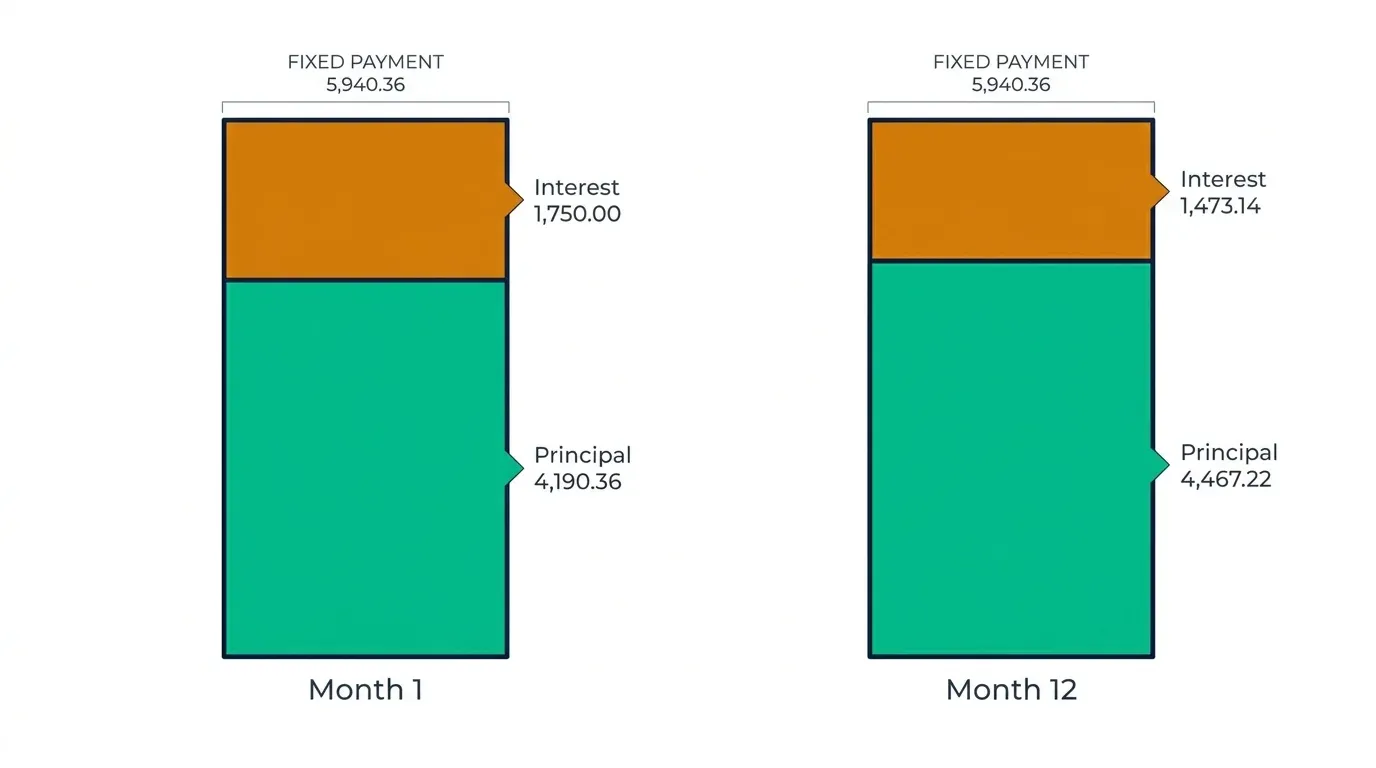
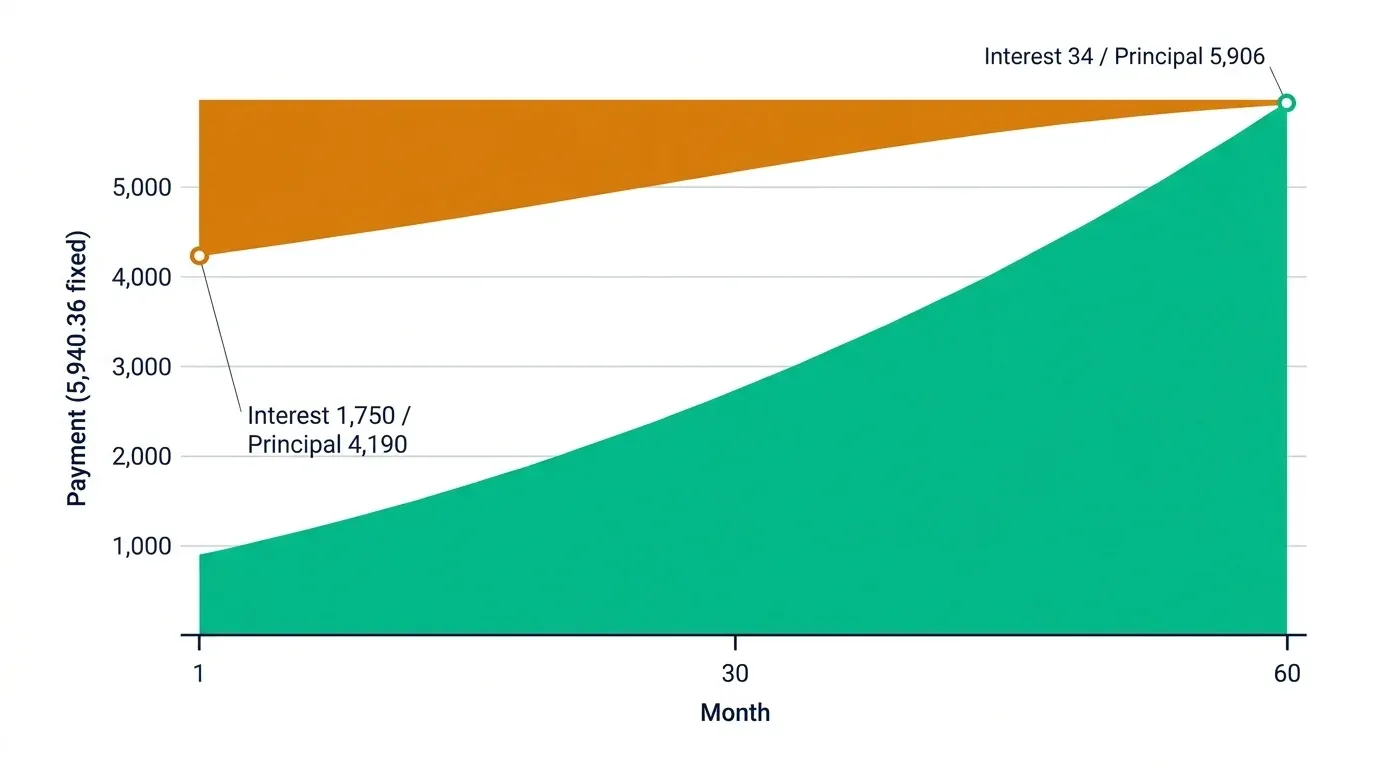
The interest portion in month 1, 1,750.00, is simply the full 300,000 balance multiplied by the monthly rate (0.5833%). The principal portion, 4,190.36, is what's left of the fixed payment once interest is covered, and it's this figure that actually reduces the loan balance going into month 2.
By month 12, with the balance entering that month down to roughly 252,538 after eleven months of principal repayment:
=IPMT(0.07/12, 12, 60, 300000)   → (1,473.14)
=PPMT(0.07/12, 12, 60, 300000)   → (4,467.22)
The interest portion has dropped from 1,750.00 to 1,473.14, not because the rate changed, but because the balance it's calculated against has shrunk. The principal portion has grown correspondingly, since the total payment stays fixed at 5,940.36 throughout.
Step 3: Proving IPMT + PPMT Always Equals PMT
This is the check worth building into every amortisation schedule, not just trusting by assumption:
=IPMT(0.07/12, 1, 60, 300000) + PPMT(0.07/12, 1, 60, 300000)
This returns exactly (5,940.36), identical to the PMT result. This will hold true for every single period across the loan's full 60-month term, and it's a genuinely useful validation formula to leave visible in a schedule: if a schedule's interest and principal columns don't sum back to the fixed payment for every row, something in the formula construction has gone wrong.
Step 4: Building the Full Schedule With SEQUENCE, No Drag-Copy
Rather than dragging IPMT and PPMT down 60 rows manually, generate the period array with SEQUENCE, the same approach covered in our guide to dynamic depreciation schedules, and let IPMT/PPMT calculate against it directly:
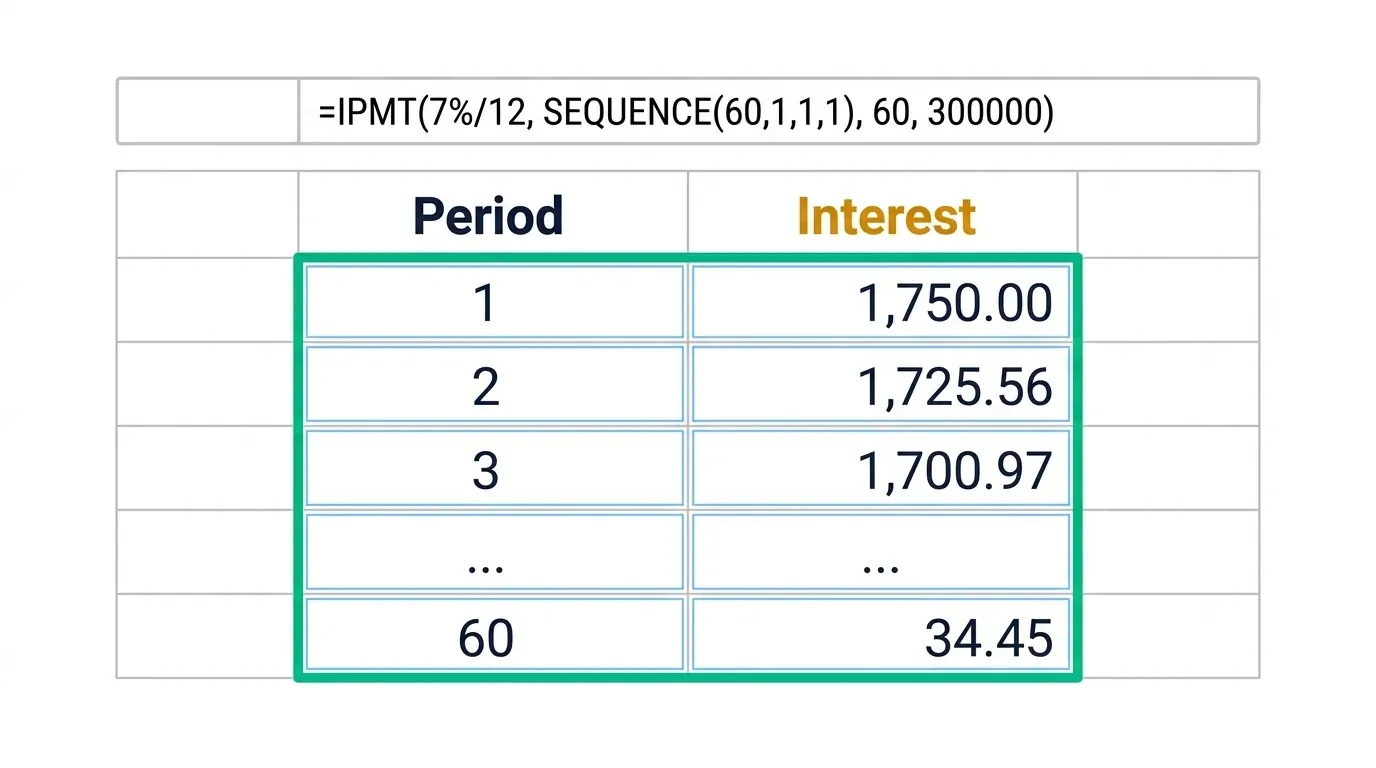
=IPMT(0.07/12, SEQUENCE(60,1,1,1), 60, 300000)
This single formula spills a full 60-row column of interest figures, one per period, without a single manual drag. The equivalent PPMT formula spills the principal column the same way, and a running balance column simply subtracts the cumulative principal spilled from the original 300,000.
Why the Interest Portion Shrinks Every Month
This is worth being explicit about, because it's the entire logic behind why the fixed payment can stay constant while its components shift: interest for any given period is always calculated on the outstanding balance at the start of that period, not on the original loan amount. As principal gets repaid month by month, the balance shrinks, so the interest charged on it shrinks too, and because the total payment is fixed, whatever interest doesn't consume goes automatically to principal instead. Over the full 5-year term of this loan, total interest paid comes to 56,421.57 against total payments of 356,421.57, meaning roughly 84% of every unit paid across the loan's life goes toward principal, though that ratio is heavily front-loaded toward interest in the early months and toward principal in the later ones.
Applying This to IFRS 16 Lease Liability Amortisation
Lease liabilities measured under IFRS 16 follow the identical amortisation logic, a fixed periodic lease payment split between a finance charge (interest) and a reduction of the lease liability (principal), using the discount rate implicit in the lease or the lessee's incremental borrowing rate in place of a loan's stated interest rate. The PMT/IPMT/PPMT structure in this article maps directly onto that requirement; the difference is in what rate and present value feed into the functions, not in the mechanics of the split itself. Where lease terms include irregular commencement dates or rent-free periods, the discounting mechanics behind our XNPV vs NPV guide become relevant too, since a lease liability with genuinely irregular payment dates has the same period-assumption exposure as an NPV-based valuation model.
Three Mistakes That Break PMT-Based Schedules
Mismatching the rate and period frequency. If payments are monthly, the rate must be divided by 12 and nper expressed in months, not annual rate against monthly periods, or monthly rate against an annual period count. This is the single most common error, and it silently produces a plausible-looking but wrong payment figure rather than an obvious error.
Forgetting the sign convention. PV is typically entered as a positive number (money received), which makes PMT, IPMT, and PPMT return negative figures (money paid out). Mixing signs inconsistently across a model, some cells positive, some negative, without a clear convention, makes a schedule difficult to audit and easy to misread.
Hardcoding the period number in IPMT/PPMT instead of referencing SEQUENCE or a row-based period column. A formula like =IPMT(0.07/12, 1, 60, 300000) copied down manually needs its 1 changed to 2, 3, and so on for every row, exactly the drag-copy problem Step 4 avoids. Reference a period column or a SEQUENCE array instead, so the schedule regenerates correctly if rows are inserted or the term changes.
When PMT/IPMT/PPMT Isn't Enough
This approach handles standard fixed-payment, fixed-rate amortising loans and leases cleanly. Once you're dealing with variable-rate loans, balloon payments, early repayment scenarios that require rebuilding the schedule mid-term, or a portfolio of leases each needing aggregated disclosure across multiple schedules, the calculation logic in this article still holds for each individual instrument, but managing many of them together by hand becomes a genuine operational burden rather than a formula problem.
If you're managing amortisation schedules alongside a broader fixed asset and lease register, DepreciationLab handles this structure natively across multiple books and instruments, with the same interest/principal split logic built in and reconciled automatically to your GL.
Frequently Asked Questions
Why does my PMT result show as a negative number?
Excel's financial functions use a cash-flow sign convention: money received (like a loan principal, entered as a positive PV) and money paid out (like the resulting payment) have opposite signs. This is deliberate, not an error, either wrap the formula in a negative sign to display it as positive, or keep the convention consistent throughout your model so every payment, interest, and principal figure reads the same way.
Does IPMT plus PPMT always equal PMT exactly, for every period?
Yes, for any given period on a standard fixed-rate, fixed-payment amortising loan. This identity is worth building into your schedule as a visible check row, if it doesn't hold for every period, something in the formula construction (a mismatched rate, period, or nper argument) has gone wrong.
Can PMT, IPMT, and PPMT handle a loan with irregular or lump-sum repayments?
Not directly. All three functions assume a standard structure of equal periodic payments over a fixed term. A loan with balloon payments, irregular lump sums, or early repayment needs either a custom schedule built period by period with adjusted balances, or a rebuilt PMT calculation from the point of the irregular payment forward using the new remaining balance and term.
How do I calculate the total interest paid over the full life of a loan?
Sum every period's IPMT result across the full term, or use Excel's CUMIPMT function, which returns the cumulative interest paid between two specified periods directly without needing to sum a full column manually.
Is the interest/principal split the same for IFRS 16 lease liabilities as it is for a standard bank loan?
The mechanical split, a fixed periodic payment separated into a finance charge and a reduction of the outstanding liability, is identical in structure. What changes is the rate used (discount rate implicit in the lease, or the lessee's incremental borrowing rate, rather than a stated loan interest rate) and potentially the treatment of variable lease payments, which IFRS 16 handles separately from the fixed-payment amortisation this article covers.
Why use SEQUENCE with IPMT/PPMT instead of just filling the formula down manually?
A manually filled formula needs its period argument (per) checked and adjusted for every row, and any change to the loan term means re-dragging the formula to a new row count. Referencing SEQUENCE means the schedule regenerates its full length automatically from the term input, the same benefit described in more depth in our guide to SEQUENCE-based depreciation schedules.
Conclusion: One Payment, Two Moving Parts
The fixed payment on an amortising loan or lease hides a genuinely dynamic split underneath it, interest shrinking, principal growing, month after month, even though the number written on the payment schedule never changes. PMT, IPMT, and PPMT calculate that split correctly without you tracking a running balance by hand, and IPMT plus PPMT always reconciling back to PMT gives you a built-in check that the schedule is right.
Here's your action plan:
- Confirm rate and period frequency match before running any of the three functions, monthly payments need a monthly rate and a period count in months, not annual figures applied to monthly periods.
- Build the IPMT + PPMT = PMT check into every schedule as a visible validation row, not just an assumption.
- Use SEQUENCE to generate the period array rather than manually dragging IPMT and PPMT down row by row.
- Apply the same structure to IFRS 16 lease liabilities, substituting the discount rate implicit in the lease for a stated loan rate.
Once built this way, adding a new loan or lease to your schedule is a matter of entering four inputs, not rebuilding sixty rows of formulas.
Part of the FinDataPro Depreciation Methods Series.
⚡Try It Yourself
PMT, IPMT, and PPMT get you a correct loan or lease schedule. Run it alongside full asset depreciation, multi-book support, and automatic GL reconciliation. Start free at Depreciation Lab →
Prashant Panchal is a Chartered Accountant (ACA) and Financial Modelling & Valuation Analyst (FMVA®) with 19 years of experience in finance, FP&A, and financial modelling across the GCC region. He is the founder of FinDataPro.
Discussion
Leave a Comment
Comments are moderated and appear once approved.